Recycling an old hard drive is a responsible way to reduce electronic waste. But before recycling any storage device, there is something important you should consider: the security of your personal or confidential data.
Hard drives can store sensitive information, including passwords, financial records, personal photographs, business documents, emails, and customer information.
Even if your computer has stopped working, its hard drive may still contain recoverable data.
Before a hard drive is recycled, the information stored on it should be securely sanitized or destroyed to prevent unauthorized access.
Understanding how secure data destruction works can help individuals and organizations protect confidential information while disposing of electronics responsibly.
What Should Happen to Your Data Before Hard Drive Recycling?
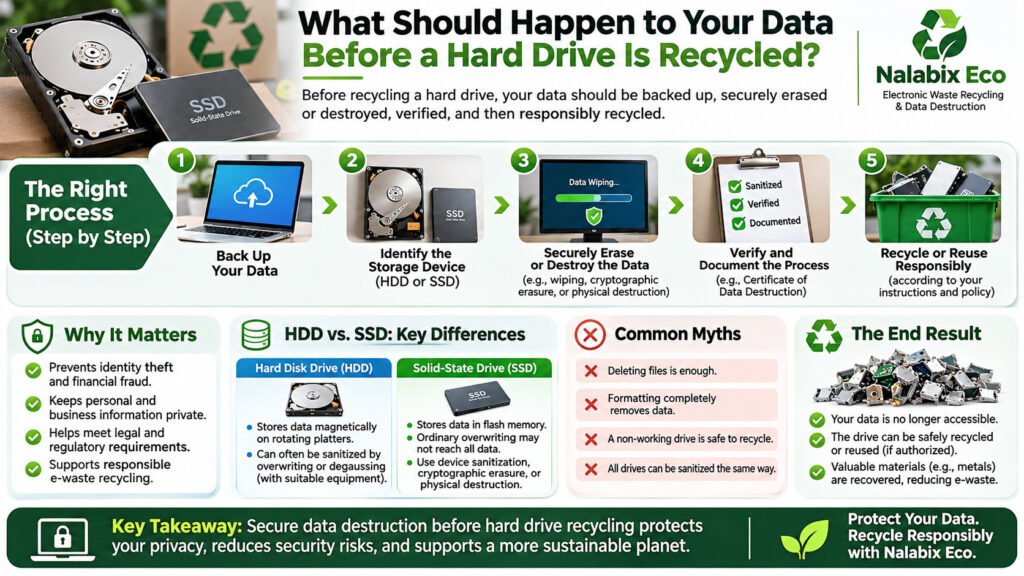
Quick answer: Before recycling a hard drive, you should back up important information, securely erase or destroy the remaining data, verify the process, and ensure the storage device is handled responsibly.
The process generally involves five important steps:
- Back up important files you wish to keep.
- Identify the storage device, including whether it is an HDD or SSD.
- Choose an appropriate sanitization method, such as secure wiping, cryptographic erasure, or physical destruction.
- Verify that the data has been properly sanitized or destroyed.
- Recycle or reuse the device responsibly, according to the owner’s authorization.
These steps help reduce the risk of exposing sensitive information during electronic waste disposal.
Why Is Secure Data Destruction Important Before Recycling?
Deleting files or removing a computer’s hard drive does not automatically guarantee that stored information is inaccessible.
Without appropriate security measures, discarded storage devices may expose individuals and organizations to:
- Identity theft and financial fraud.
- Unauthorized access to personal information.
- Exposure of confidential business documents.
- Data breaches and privacy violations.
- Potential regulatory and contractual consequences.
This makes secure hard drive disposal an important part of responsible electronic waste management.
How Should Data Be Destroyed Before Hard Drive Recycling?
There are several recognized approaches to data sanitization and destruction. The appropriate method depends on the device, its condition, the sensitivity of the information, and whether reuse is permitted.
1. Secure Data Wiping
Secure data wiping uses specialized procedures to sanitize storage devices while potentially keeping them functional.
For traditional hard disk drives (HDDs), appropriate overwriting or supported device sanitization operations may be used to remove access to previous information.
Solid-state drives (SSDs) require additional consideration because internal memory management can make ordinary overwriting unreliable.
Where supported, properly implemented device sanitization commands or cryptographic erasure may be suitable.
The NIST SP 800-88 Revision 2 Guidelines for Media Sanitization provide internationally useful guidance for establishing effective media sanitization programs.
For devices intended for authorized reuse, professional secure data wiping services can help ensure appropriate procedures and verification are followed.
2. Physical Hard Drive Destruction
Physical destruction is commonly used when storage devices contain highly sensitive information, are damaged, cannot be reliably sanitized, or must not be reused.
Depending on the storage technology and security requirements, suitable processes may include controlled crushing, cutting, or shredding.
The destruction method must adequately damage the actual data-bearing components, rather than merely damaging the external casing.
For traditional HDDs, these components include the magnetic platters. For SSDs, they include flash memory chips.
Once securely destroyed, the remaining materials can proceed through appropriate recycling channels.
Learn more about hard drive destruction and secure disposal.
3. Cryptographic Erasure
Cryptographic erasure is a sanitization method that makes properly encrypted information inaccessible by securely eliminating the necessary encryption keys.
It can be useful for compatible storage devices where encryption was correctly implemented and key sanitization can be verified.
However, deleting encryption keys is not automatically sufficient in every situation. The effectiveness of this method depends on the encryption implementation, device configuration, and verification procedures.
The UK National Cyber Security Centre’s storage media sanitization guidance provides further information on selecting appropriate approaches for storage media.
Is Deleting Files or Formatting a Hard Drive Enough?
No. Simply deleting files, emptying the Recycle Bin, or performing a quick format does not reliably sanitize a storage device.
Deleting a file may remove its reference from the file system without immediately overwriting the underlying information.
Similarly, formatting a drive can recreate its file system while leaving previously stored information recoverable.
A factory reset may provide adequate sanitization on certain devices, but its effectiveness depends on how the manufacturer implements the process.
For sensitive information, use a suitable verified sanitization method or arrange professional data destruction.
HDD vs. SSD: Does the Type of Drive Matter?
Yes. HDDs and SSDs use different technologies, meaning their data sanitization requirements are not always the same.
| Hard Disk Drive (HDD) | Solid-State Drive (SSD) |
|---|---|
| Stores data on magnetic platters | Stores data using flash memory |
| Appropriate overwriting may be suitable | Ordinary overwriting may not reach all previously stored information |
| Can be sanitized or physically destroyed | May require supported device sanitization, cryptographic erasure, or destruction |
| Compatible magnetic media may be degaussed | Degaussing is ineffective for flash memory |
Selecting the correct method helps ensure the sanitization process addresses the device’s actual storage technology.
What Happens After Secure Data Destruction?
After the required sanitization or destruction process has been completed and verified, the device can move to the next stage of its approved disposition process.
For recycling, this may include:
- Sorting and identifying storage devices.
- Controlled dismantling and material separation.
- Recovering recyclable metals and other suitable materials.
- Directing remaining components to appropriate downstream recycling facilities.
A successfully sanitized functional drive may be suitable for authorized reuse. However, if the owner requires complete destruction, that instruction must be respected.
Responsible computer recycling should combine information security, appropriate material recovery, and environmental responsibility.
How Can You Verify That Your Data Was Securely Destroyed?
For businesses, institutions, and organizations handling confidential information, verification and documentation are particularly important.
A professional service provider may issue a Certificate of Data Destruction and supporting records detailing the work performed.
Depending on the service and agreed requirements, documentation may include the device type, serial number, sanitization or destruction method, processing date, verification results, and chain-of-custody records.
The Information Commissioner’s Office guidance on hardware asset management also emphasizes appropriate disposal controls and records of secure hardware disposal.
A certificate should be supported by a reliable process and relevant evidence rather than being treated as proof on its own.
Frequently Asked Questions About Hard Drive Recycling and Data Security
Can someone recover data from a recycled hard drive?
Yes, potentially. If a hard drive has not been properly sanitized or destroyed, previously stored data may remain recoverable. Secure sanitization or appropriate physical destruction reduces this risk.
Should I wipe my hard drive before recycling it?
Yes, where possible. Ensure important information is backed up first, then use an appropriate sanitization method. If you cannot securely erase the drive, choose a professional data destruction service.
Can data be recovered from a damaged hard drive?
Sometimes. A damaged or non-working hard drive can still contain recoverable information. Equipment failure alone does not guarantee data destruction.
Is physical destruction better than data wiping?
It depends on the security requirements and whether the drive is intended for reuse. Properly verified wiping may allow authorized reuse, while physical destruction is suitable when reuse is prohibited or secure sanitization cannot be assured.
What is a Certificate of Data Destruction?
A Certificate of Data Destruction records the destruction service performed on specified storage media. It may identify the destruction method, date, device details, and other relevant verification information.
Can a physically destroyed hard drive still be recycled?
Yes. Properly destroyed hard drives can contain recyclable materials, including metals, that may be recovered through suitable recycling processes.
Secure Hard Drive Recycling and Data Destruction with Nalabix Eco
At Nalabix Eco, we provide electronic waste management and secure data destruction services for individuals, businesses, and institutions.
Our services include secure handling of electronic waste, specialized data wiping, appropriate physical destruction, responsible recycling, and applicable service documentation.
We understand that some clients may authorize the reuse of securely sanitized equipment, while others require complete destruction of their retired electronic assets.
Learn more about our electronic waste recycling and data destruction services, or visit Nalabix Eco to discuss your requirements.
Protect your information. Secure your devices. Recycle responsibly.