HDD vs SSD Destruction: Why Do HDDs and SSDs Need Different Handling Decisions?
Two storage drives may contain exactly the same confidential information, yet require completely different methods to ensure that information can no longer be recovered.
Hard disk drives (HDDs) and solid-state drives (SSDs) are widely used in computers, servers, laptops and data centres. Although they serve the same purpose, their internal construction and data storage technologies are fundamentally different.
Understanding these differences is essential when retiring IT equipment, protecting sensitive information and selecting an appropriate data destruction method.
What is the difference between HDDs and SSDs?
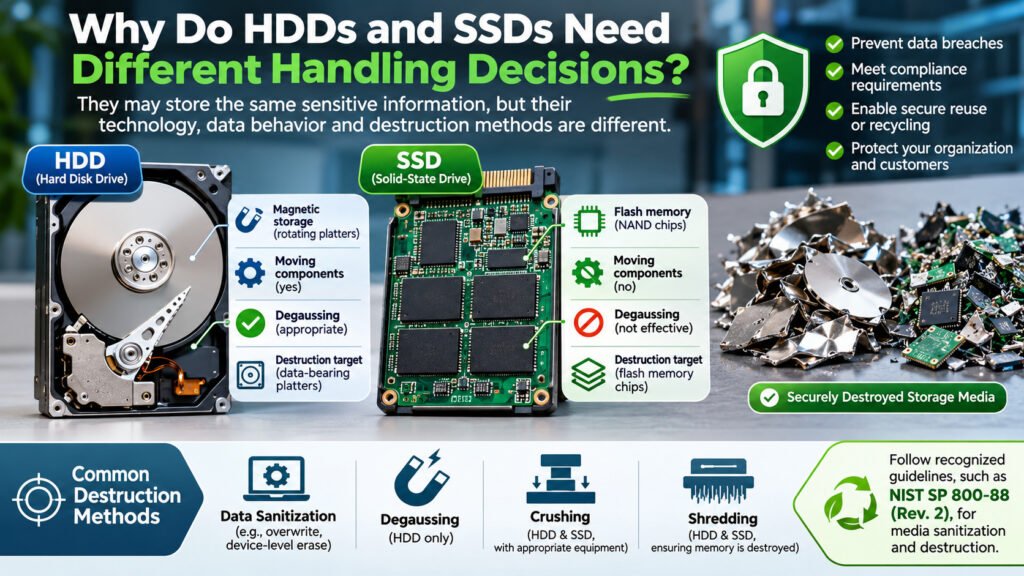
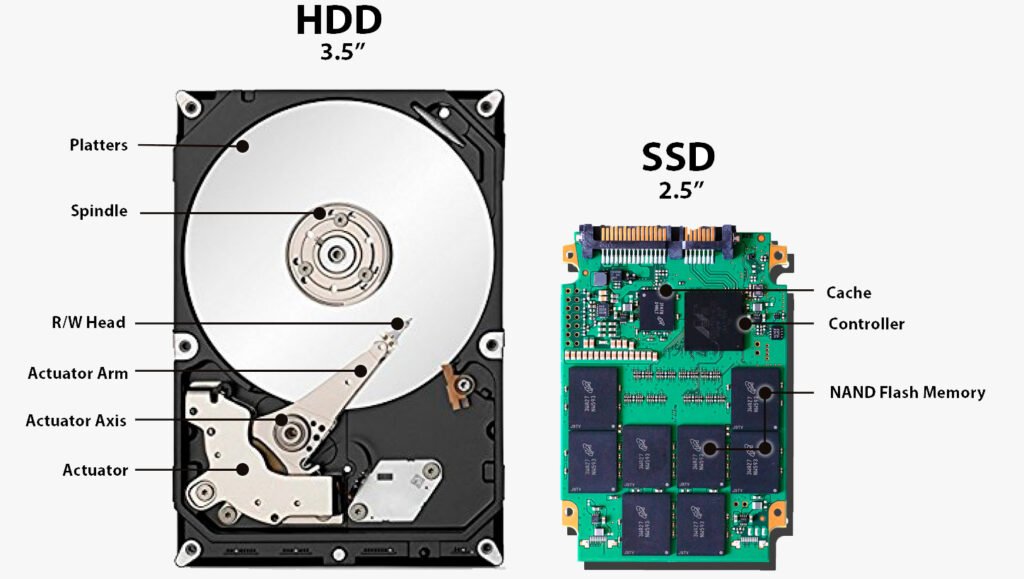
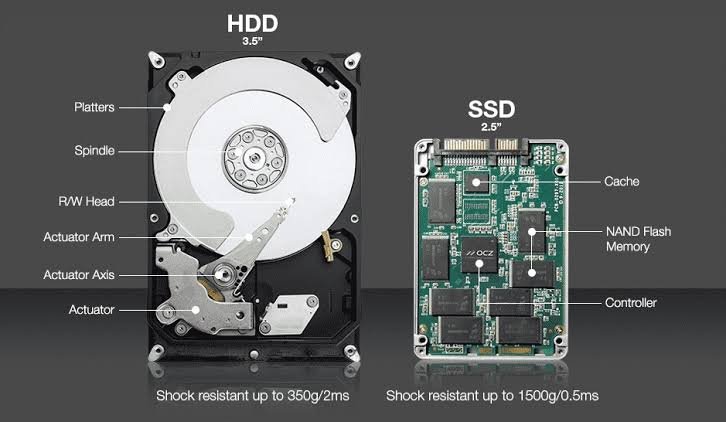
A hard disk drive stores information magnetically on rotating platters, while a solid-state drive stores information electronically within NAND flash memory chips.
These differences determine how data can be accessed, erased, destroyed and recovered.
| Feature | HDD | SSD |
|---|---|---|
| Storage technology | Magnetic platters | NAND flash memory |
| Moving components | Yes | No |
| Data storage method | Magnetic recording | Electronic storage |
| Degaussing | Suitable for compatible magnetic media | Ineffective |
| Data sanitization | Appropriate overwrite or device-specific sanitization | Device-specific sanitization or eligible cryptographic erasure |
| Physical destruction target | Data-bearing platters | NAND flash memory chips |
The most important consideration during disposal is not simply whether a drive stops working, but whether the information stored inside it remains recoverable.
Why do HDDs and SSDs require different destruction methods?
1. They store data differently
HDDs store information on magnetic surfaces. Effective physical destruction must therefore target the data-bearing platters.
SSDs store information across multiple flash memory chips. Damaging the external casing, connectors or controller does not necessarily destroy the stored information.
Physical SSD destruction must adequately destroy the data-bearing memory components.
2. Traditional data wiping may not work the same way
Appropriate overwriting techniques can be effective for sanitizing magnetic hard drives, depending on the required security level.
SSDs, however, use technologies such as wear levelling, spare memory allocation and bad-block management. These technologies can prevent conventional overwriting tools from reaching every physical storage location.
SSDs may therefore require supported device-level sanitization commands, block erasure or cryptographic erasure when the necessary encryption conditions are met.
Learn more about secure data wiping and how storage devices can be sanitized for potential reuse.
3. Degaussing does not work on SSDs
Degaussing uses a powerful magnetic field to disrupt information stored on compatible magnetic media.
Because SSDs store information electronically rather than magnetically, degaussing is not an effective SSD sanitization method.
Even for HDDs, degaussing equipment must be suitable for the specific magnetic media being processed.
4. Physical destruction requirements are different
Both HDDs and SSDs can undergo professional physical destruction. However, the equipment, destruction process and required particle size may differ depending on the media technology and applicable security requirements.
A physically damaged drive is not necessarily a securely destroyed drive.
The process must target the components that actually hold the information.
Explore professional hard drive destruction services.
Choosing the right data destruction method
Not every storage device needs to be physically destroyed. The appropriate decision depends on its condition, data sensitivity, intended future use and the organization’s security policies.
| Method | HDD | SSD |
|---|---|---|
| Conventional overwriting | Conditional suitability | Limited suitability |
| Device-level sanitization | Supported models | Supported models |
| Cryptographic erasure | Eligible encrypted drives | Eligible encrypted drives |
| Degaussing | Compatible magnetic drives | Not suitable |
| Crushing | Conditional suitability | Requires appropriate equipment and results |
| Shredding | Suitable when properly performed | Suitable when flash memory is adequately destroyed |
Organizations generally have three handling options:
- Data sanitization only: When equipment is functional and authorized for reuse.
- Data sanitization followed by physical destruction: When additional security assurance is required and sanitization is feasible.
- Physical destruction only: When drives are faulty, cannot be reliably sanitized or must be destroyed under organizational policy.
The NIST SP 800-88 Revision 2 Guidelines for Media Sanitization provide a framework for selecting appropriate sanitization methods based on information sensitivity, media technology and security requirements.
What happens to HDDs and SSDs during professional disposal?
A responsible data destruction process typically includes:
- Asset identification and serial number recording.
- Classification of storage media as HDDs, SSDs or other storage technologies.
- Assessment of device condition and information security requirements.
- Selection of an authorized sanitization or destruction method.
- Execution, verification and validation of the selected process.
- Documentation and issuance of an appropriate destruction or sanitization certificate.
- Responsible recycling of retired equipment and destroyed materials.
This approach helps organizations maintain accountability, protect confidential information and support environmental responsibility.
For equipment requiring permanent retirement, explore secure hard drive disposal and recycling.
Why proper storage media destruction matters
Improper disposal of HDDs and SSDs can expose organizations and individuals to data breaches, identity theft, financial fraud and unauthorized access to confidential information.
These risks are particularly important for financial institutions, healthcare facilities, government agencies, educational institutions, technology companies and data centres.
Depending on the jurisdiction, organizations may also have obligations under applicable data protection and privacy regulations.
Properly documented data destruction supports information security, regulatory compliance, audit readiness and responsible electronic waste management.
Frequently asked questions
Can HDDs and SSDs be destroyed using the same machine?
Yes, provided the equipment is designed and configured to adequately destroy the data-bearing components of both storage technologies and meet the applicable security requirements.
Does formatting an HDD or SSD permanently remove data?
No. Ordinary formatting or deleting files should not be treated as proof of secure data sanitization.
Can a damaged SSD still contain recoverable data?
Yes. Information may remain within intact flash memory chips even when the SSD is no longer operational.
Must all HDDs and SSDs be physically destroyed?
No. Properly sanitized drives may be reused when their condition, security requirements and organizational policies permit it.
Can HDDs and SSDs be recycled after destruction?
Yes. Destroyed storage media can enter appropriate recycling channels for the recovery of metals and other recyclable materials.
Conclusion
HDDs and SSDs may perform the same function, but their different storage technologies require different handling decisions at the end of their useful life.
Selecting the correct sanitization or destruction method helps prevent unauthorized data recovery while supporting responsible equipment reuse and recycling.
Nalabix Eco supports organizations with secure data destruction, storage media handling, documented disposal and responsible electronic waste recycling.
The objective is not simply to destroy a device. It is to ensure that the information it contains is no longer recoverable within the required security level.