
Have an old computer sitting unused at home, in an office, or in a storage room? Before throwing it away, consider whether it could still serve a useful purpose.
An outdated computer is not necessarily electronic waste. Some devices can be repaired, upgraded, reused, or donated, while others have reached the end of their useful life and should be recycled responsibly.
So, should you donate, reuse, or recycle an old computer?
The best choice depends on its condition, functionality, security, and whether someone can still benefit from using it.
Quick Answer: Donate, Reuse, or Recycle?
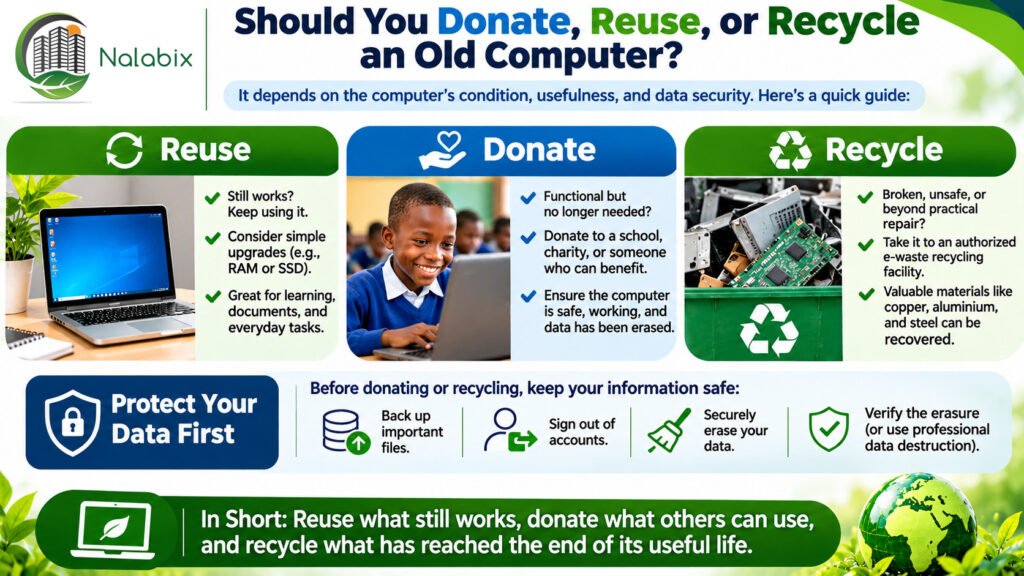
Reuse an old computer if it still works safely and meets your needs, especially after a reasonable upgrade.
Donate an old computer if it is functional, secure, and suitable for another person, school, charity, or community organization.
Recycle an old computer if it is beyond practical repair, unsafe, no longer suitable for reliable use, or cannot be securely prepared for reuse.
The general principle is simple: extend the computer’s useful life where practical, and recycle it responsibly when reuse is no longer appropriate.
1. When Should You Reuse an Old Computer?
Just because a computer is slow or outdated doesn’t mean it has become useless.
In many cases, a computer can continue working for years with appropriate maintenance or upgrades.
Consider reusing your computer if:
- It still powers on and operates reliably.
- Its hardware remains in reasonable condition.
- Its operating system and essential software can receive security updates.
- Repairs or upgrades are affordable and practical.
- It can still perform useful tasks.
Ways to Give an Old Computer a Second Life
An older computer might be useful for basic document work, learning, offline media storage, or other low-demand activities.
For example, upgrading the RAM or replacing an older hard disk with a solid-state drive (SSD) may improve performance.
However, security matters. A computer running an unsupported operating system should not be used for sensitive or internet-connected activities without an appropriate security solution.
Extending the life of electronics can reduce demand for replacement equipment and the resources required to manufacture it.
2. When Should You Donate an Old Computer?
If your computer still works but you no longer need it, donating it may be a meaningful alternative to recycling.
A functional computer can provide useful technology to someone who might otherwise struggle to access it.
Potential recipients include:
- Schools and educational institutions.
- Nonprofit and charitable organizations.
- Community learning centers.
- Students and families.
- Digital inclusion and computer refurbishment programs.
What Makes a Computer Suitable for Donation?
Before donating, ensure that the computer is safe, functional, and useful to its intended recipient.
Ideally, it should have a working display, functional keyboard and ports, a suitable power supply, and an operating system that can be maintained securely.
Always check with the receiving organization first. Some donation programs only accept computers that meet specific technical requirements.
Donating a broken or unusable computer without the recipient’s agreement can simply transfer the recycling burden to someone else.
Most importantly, personal or organizational information must be securely removed before ownership is transferred.
Learn more about preparing electronics for reuse through the US Environmental Protection Agency’s guidance on electronics donation and recycling.
3. When Should You Recycle an Old Computer?
Recycling becomes the preferred option when a computer has reached the end of its practical useful life.
Consider recycling if:
- The computer no longer works and repair is impractical.
- Critical components are damaged or unsafe.
- The equipment cannot support necessary security requirements.
- Repair costs outweigh the realistic benefits of continued use.
- Organizational policy requires the equipment to be destroyed rather than reused.
Computers contain materials such as copper, aluminium, steel, plastics, and circuit boards that may be recovered through appropriate recycling processes.
Rather than disposing of computers with ordinary household or commercial waste, use an authorized electronics recycling service.
Discover how computer recycling works and why the proper management of obsolete equipment is important.
You can also explore what urban mining means and how valuable resources are recovered from discarded electronics.
4. Protect Your Data Before Donating or Recycling
Whether you choose to donate or recycle your computer, protecting your personal information should be a priority.
An old computer may contain:
- Personal photographs and documents.
- Saved passwords and account information.
- Banking or financial records.
- Emails and browsing information.
- Confidential business or customer data.
Simply deleting files, emptying the recycle bin, or reinstalling an operating system may not securely remove all recoverable information.
What Should You Do Before Letting Your Computer Go?
- Back up important files. Transfer documents, photographs, and other information you want to keep.
- Sign out of accounts. Disconnect cloud services, remove device-management associations where appropriate, and check for linked accounts.
- Identify all storage devices. Check internal HDDs, SSDs, removable drives, and memory cards.
- Sanitize the storage media. Use a suitable, verified data-erasure method for the specific device and sensitivity of the information.
- Verify the outcome. Where secure sanitization cannot be completed or verified, consider professional assistance, removing the drive, or physical destruction where appropriate.
For organizations managing confidential information, professional data destruction may be necessary before computers are recycled.
The NIST SP 800-88 Revision 2 Guidelines for Media Sanitization provide a recognized framework for choosing appropriate sanitization methods.
For further reading, explore secure data wiping and professional data destruction services.
Important: If a storage device must be physically destroyed, the computer may still have other components suitable for reuse or material recovery. However, the computer will need suitable replacement storage if it is to be donated as a functioning device.
5. Donation vs. Reuse vs. Recycling: Which Is Better?
All three options can contribute to responsible electronics management, but each serves a different purpose.
| Computer condition | Recommended action |
|---|---|
| Working and still useful to you | Reuse |
| Working but no longer needed | Donate |
| Slow but reasonably upgradeable | Repair or upgrade |
| Functional but contains sensitive information | Securely sanitize before donation or reuse |
| Broken beyond practical repair | Recycle |
| Unsafe or severely damaged | Arrange specialist recycling |
| Must be destroyed under company policy | Authorized destruction and recycling |
There is no single solution for every old computer. The most responsible decision considers usability, data security, environmental impact, and the needs of the next user.
6. Why Does Your Decision Matter to the Environment?
Millions of computers and other electronic devices reach the end of their useful lives every year.
According to the Global E-waste Monitor 2024, the world generated approximately 62 million tonnes of electronic waste in 2022, but only 22.3% was documented as formally collected and recycled.
This highlights why responsible management of unwanted electronics matters.
Reusing or donating a functioning computer can extend its useful life, while recycling helps recover materials from equipment that can no longer be used.
Both approaches support a more circular economy, where products and materials remain useful for as long as practical.
Read more about the importance of recycling and electronic waste management.
7. What Should Businesses and Organizations Do With Old Computers?
For businesses, hospitals, schools, government institutions, and other organizations, deciding what happens to obsolete computers often involves more than evaluating their physical condition.
Organizations should also consider:
- Ownership and authorization for disposal.
- Internal information-security policies.
- Data sanitization and destruction requirements.
- Asset inventories and chain-of-custody documentation.
- Environmental compliance and applicable recycling records.
Some organizations allow equipment to be refurbished or donated after secure data sanitization. Others require complete destruction of certain devices or components because of security policies or contractual obligations.
The appropriate disposal process should reflect the asset owner’s instructions, applicable legal requirements, and data-security risks.
Professional IT asset disposal and data destruction services can help organizations manage these responsibilities.
Frequently Asked Questions
Is it better to donate or recycle an old computer?
Donating is generally preferable when the computer remains safe, functional, and useful. Recycling is appropriate when reuse is no longer practical.
Can broken computers be recycled?
Yes. Even nonfunctional computers may contain recoverable metals, plastics, and other useful materials.
Should I remove my hard drive before recycling?
Not always. Properly verified data sanitization may be sufficient. If secure erasure is not possible, removing and physically destroying the drive may be appropriate.
Can businesses donate old computers?
Yes, provided the donation complies with their asset disposal policies, data-security requirements, and applicable regulations.
Final Thoughts
Choosing whether to donate, reuse, or recycle an old computer depends on its condition and usefulness.
Reuse what still works, donate what others can use, and recycle what has reached the end of its useful life.
At Nalabix Eco, we support responsible electronic waste collection, computer recycling, and secure data destruction to help protect information and the environment.
Contact Nalabix Eco for responsible computer recycling and secure disposal services