
What Happens If Electronics Go to Landfill?
Electronic waste is growing worldwide, but what happens when old computers, phones, televisions, batteries, and other electronics end up in a landfill? Learn about the environmental risks, valuable materials that are lost, data security concerns, and why responsible e-waste recycling is a better solution. So, what actually happens when electronics end up in a landfill? The short answer: valuable resources are lost, and poorly managed electronic waste can create environmental and health risks. Understanding what happens next highlights why responsible e-waste recycling matters. What Happens to Electronics in a Landfill? Electronic devices do not simply disappear after they are thrown away. They are buried alongside other waste and can remain in the landfill for many years. As devices break down, their different materials behave in different ways. Plastics may persist for long periods, metals can corrode, and certain components may release substances into the surrounding waste environment. The conditions inside a landfill can also change over time due to moisture, temperature, and decomposition. This makes electronics fundamentally different from ordinary waste. 1. Electronics Take Up Valuable Landfill Space Electronic devices contain many different components packed into relatively small products. When large quantities of electronics are sent to landfills, they contribute to the growing volume of waste. Landfills have limited capacity, and disposing of materials that could potentially be recovered, recycled, or reused makes poor use of available resources. 2. Harmful Substances Can Enter the Environment Some electronic products contain substances that require careful handling. When electronics are damaged or exposed to landfill conditions, certain components can release contaminants. Rainwater passing through waste can create leachate, a liquid that may carry pollutants from discarded materials into surrounding soil and water if not properly contained and managed. This can create risks for ecosystems and communities near poorly managed waste sites. 3. Burning Electronics Can Create Additional Pollution Electronics should never be burned as a way of getting rid of them. When plastics, cables, circuit boards, and other electronic components are burned under uncontrolled conditions, they can release harmful smoke and pollutants into the air. Open burning is particularly dangerous because it provides little control over the substances released or the people exposed to them. 4. Valuable Materials Are Lost One of the biggest disadvantages of sending electronics to landfill is the loss of recoverable resources. Electronic devices can contain materials such as: Through proper recycling, many of these materials can be separated and returned to productive use. This reduces the need to extract as many new raw materials from the earth. 5. Electronics Can Represent a Data Security Risk For businesses, throwing an old computer, hard drive, server, or smartphone into general waste creates another concern: data security. A device that appears broken or useless may still contain sensitive information. Business records, customer information, passwords, financial data, and other confidential files can remain on storage devices unless the data has been properly erased or the storage media securely destroyed. That is why responsible electronic disposal should include secure data destruction where applicable. 6. Recycling Can Keep Electronics Out of Landfills Responsible e-waste recycling provides a better alternative to simply sending unwanted electronics to landfill. A professional recycling process can involve: Collection → Sorting → Data Destruction → Dismantling → Material Recovery → Responsible Recycling Depending on the equipment and its condition, some devices or components may also be suitable for reuse or refurbishment. The goal is to recover as much value as possible while ensuring materials that cannot be reused are handled responsibly. What Happens When Electronics Are Recycled Instead? Responsible e-waste recycling gives old electronics a different path. A typical process may include: CollectionOld electronics are gathered and transported responsibly. SortingEquipment is separated according to type, condition, and material. Data DestructionData-bearing devices are securely sanitized or physically destroyed when required. DismantlingEquipment is taken apart so different components and materials can be separated. Material RecoveryMetals, plastics, glass, and other recoverable materials are processed for recycling. Responsible Downstream RecyclingMaterials that cannot be handled locally may be sent through appropriate specialized recycling channels. The exact process depends on the equipment, local regulations, and the recycling facility involved. Landfill vs. Responsible E-Waste Recycling Landfill Disposal Responsible E-Waste Recycling Valuable materials remain buried Recoverable materials can be separated Adds electronics to general waste Keeps e-waste within appropriate recycling streams Potential contamination concerns Materials are processed through controlled systems Data may remain on storage devices Data can be securely sanitized or destroyed Resources are lost Materials can return to productive use What Should You Do With Old Electronics? Before throwing away an electronic device, ask: Can it be repaired, reused, refurbished, donated, or recycled? If the device contains personal or business information, address the data before handing it over. For businesses managing large volumes of obsolete IT equipment, a structured IT Asset Disposition (ITAD) process can help coordinate collection, data destruction, recycling, documentation, and environmental responsibility. And importantly, do not place electronics or batteries in general waste when dedicated e-waste collection and recycling options are available. The Bigger Picture The landfill is often viewed as the end of an electronic product’s life. In reality, it can represent the loss of materials that still have value. Old electronics can contain resources that can be recovered and used again. At the same time, some components require careful handling to prevent unnecessary environmental and safety risks. That is why responsible e-waste management is more than simply getting rid of old equipment. The better question isn’t “How do I throw away this electronic device?” It’s “How can I make sure this device is handled responsibly at the end of its useful life?” Choosing appropriate reuse, refurbishment, data destruction, and e-waste recycling options can help keep valuable materials in circulation and reduce the amount of electronics entering landfills.
Should You Donate or Recycle Old Electronics? A Simple Guide
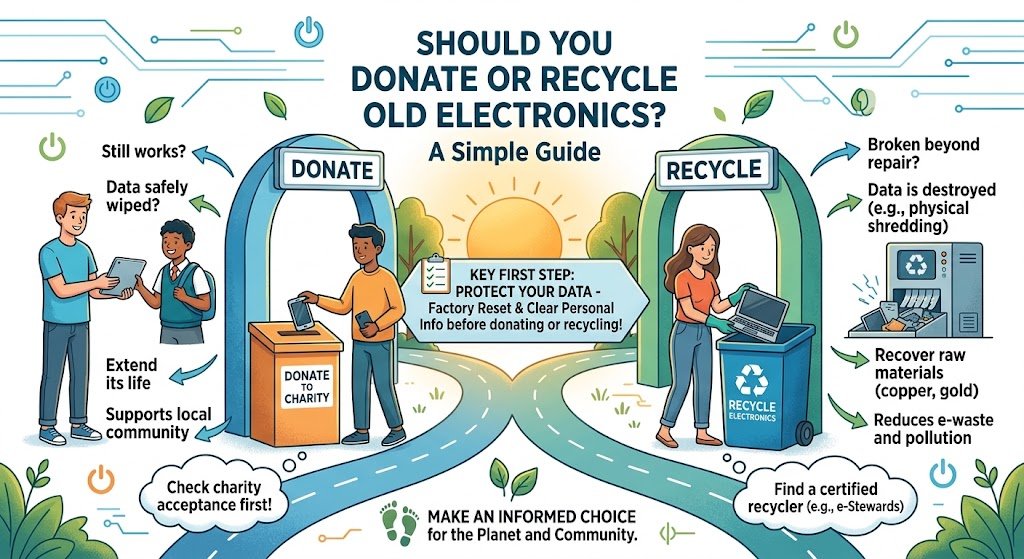
What should you do with an old laptop, phone, computer, printer, monitor, or other electronic device you no longer need? You generally have two responsible options: donate it if it is still useful, or recycle it if it has reached the end of its practical life. Choosing correctly can extend the life of electronics, protect your data, reduce electronic waste, and help recover valuable materials. But before deciding, there are a few important questions to ask. Donate or Recycle: Which Is Better? The answer depends on the condition, usefulness, age, and data stored on the device. A simple rule is: If someone can still safely and practically use it, consider donating or reusing it. If it is broken, obsolete, or no longer practical to use, recycle it responsibly. However, don’t treat donation as a way to get rid of equipment that is effectively waste. Passing unusable electronics to another person simply moves the disposal problem elsewhere. When Should You Donate Old Electronics? Donation can be a good option when an electronic device is: For example, a working laptop that is no longer needed by one person could potentially support a student, nonprofit, community program, or another user. Reuse keeps a product in service longer, which can reduce the demand for new electronics and the resources required to manufacture them. Prepare Electronics Before Donation Before donating a device, don’t simply hand it over. Take time to: For computers, servers, hard drives, SSDs, and other storage devices containing sensitive information, organizations should consider a verified data sanitization or destruction process rather than relying only on deleting files. When Should You Recycle Old Electronics? Recycling is usually the better option when equipment has reached the end of its useful life. Consider recycling electronics that are: Old electronics should not simply be placed in ordinary household trash where dedicated e-waste collection or recycling options are available. What If the Device Can Be Repaired? There is another option between donation and recycling: repair and reuse. A slow computer may only need additional memory or storage. A phone may need a battery replacement. A printer might only require a relatively simple repair. Keeping an electronic product in use for longer can reduce the need to replace it prematurely. So before recycling, ask: Can this device be safely repaired and realistically used again? If the answer is yes, extending its useful life may be the most sustainable choice. Don’t Let Your Data Become E-Waste One of the biggest risks associated with old electronics isn’t environmental—it’s data security. Computers, smartphones, servers, hard drives, SSDs, USB drives, and other devices can contain sensitive information long after they stop being used. This may include: Deleting a file does not necessarily mean the underlying data has been securely removed. Before donating, reselling, reusing, or recycling a data-bearing device, use an appropriate data sanitization or secure destruction method based on the sensitivity of the information. For organizations, maintaining documentation such as a certificate of data destruction can also provide evidence that retired data-bearing assets were handled appropriately. Donation vs Recycling: A Quick Comparison Situation Better Option Working laptop in good condition Donate or reuse Functional smartphone Donate or reuse Working monitor Donate or reuse Broken computer that is uneconomical to repair Recycle Obsolete printer Recycle Damaged or non-functional electronics Recycle Device containing sensitive business data Secure data sanitization/destruction first Repairable equipment Repair and reuse Equipment with no practical reuse value Recycle The key principle is reuse before recycling, and recycle before disposal whenever practical. Why Responsible E-Waste Recycling Matters Electronics contain materials that can potentially be recovered and reused. These include metals, plastics, glass, and various electronic components. Responsible recycling helps: Recycling is therefore not simply about getting rid of old electronics. It is also about recovering value from products that have reached the end of their useful life. What About Businesses With Large Amounts of Old Electronics? For businesses, handling obsolete IT equipment requires more planning than simply putting devices aside for collection. A responsible process may include: Identify → Assess → Secure Data → Reuse/Donate → Recycle → Document Businesses should identify equipment that is being retired, determine whether it can be reused, protect any data stored on it, and ensure equipment that cannot be reused is sent through an appropriate e-waste recycling process. For larger IT environments, an IT Asset Disposition (ITAD) program can help organizations manage retired computers, servers, storage devices, networking equipment, and other technology assets in a structured way. Common Mistakes to Avoid 1. Donating unusable electronics If something is effectively broken beyond repair, donating it may only transfer the waste to someone else. 2. Throwing electronics into general waste Electronic equipment should be handled through appropriate e-waste channels whenever possible. 3. Assuming deleted files are permanently gone Data protection should be treated as a separate step from physical recycling. 4. Ignoring batteries Some electronics contain batteries that require appropriate handling. Do not assume they belong in ordinary waste. 5. Forgetting documentation Businesses may need records showing what happened to retired equipment, particularly where sensitive data or compliance requirements are involved. A Simple Decision Checklist Before getting rid of an old electronic device, ask: Is it still working? → Yes: Can someone realistically use it?→ Yes: Reuse, donate, or refurbish it. Is it repairable? → Yes: Consider repairing it and extending its useful life. Is it broken, obsolete, or no longer practical to use? → Yes: Send it to a responsible e-waste recycling service. Does it contain sensitive data? → Yes: Securely sanitize or destroy the data before the equipment leaves your control. Frequently Asked Questions Is it better to donate or recycle electronics? If an electronic device is still functional and useful, donation or reuse can extend its life. If it is broken, obsolete, or beyond practical repair, responsible recycling is generally the better option. Should I erase my data before donating a computer? Yes. Personal and business data should be securely removed before donating, transferring, or recycling a computer. Can old electronics be