
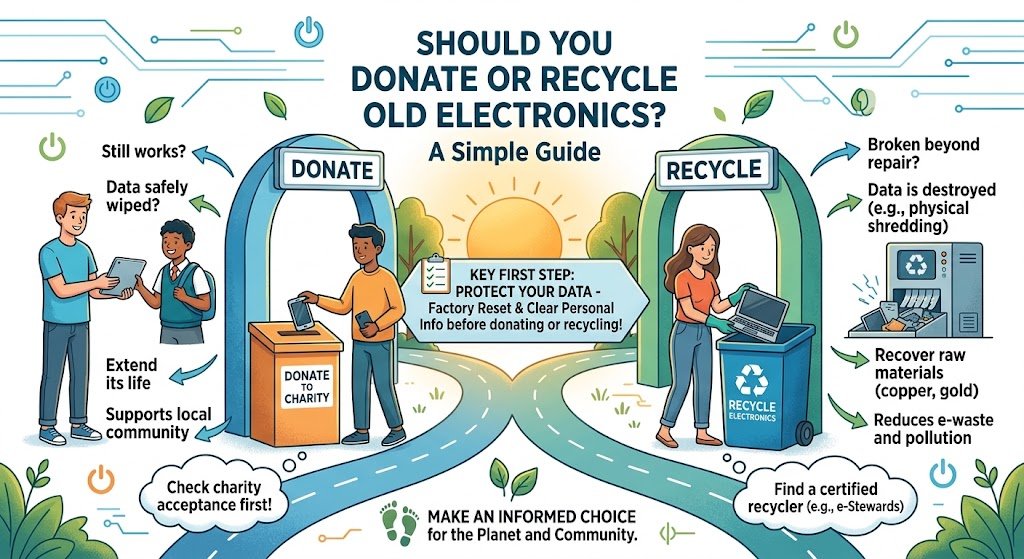
What should you do with an old laptop, phone, computer, printer, monitor, or other electronic device you no longer need?
You generally have two responsible options: donate it if it is still useful, or recycle it if it has reached the end of its practical life.
Choosing correctly can extend the life of electronics, protect your data, reduce electronic waste, and help recover valuable materials.
But before deciding, there are a few important questions to ask.
Donate or Recycle: Which Is Better?
The answer depends on the condition, usefulness, age, and data stored on the device.
A simple rule is:
If someone can still safely and practically use it, consider donating or reusing it. If it is broken, obsolete, or no longer practical to use, recycle it responsibly.
However, don’t treat donation as a way to get rid of equipment that is effectively waste. Passing unusable electronics to another person simply moves the disposal problem elsewhere.
When Should You Donate Old Electronics?
Donation can be a good option when an electronic device is:
- Fully functional or easily repairable
- Safe to use
- Not excessively outdated
- Compatible with modern software or systems
- In reasonable physical condition
- Still useful to another person or organization
For example, a working laptop that is no longer needed by one person could potentially support a student, nonprofit, community program, or another user.
Reuse keeps a product in service longer, which can reduce the demand for new electronics and the resources required to manufacture them.
Prepare Electronics Before Donation
Before donating a device, don’t simply hand it over.
Take time to:
- Back up any information you need.
- Sign out of accounts.
- Remove personal information.
- Perform appropriate data sanitization.
- Remove SIM cards and memory cards where applicable.
- Reset the device according to the manufacturer’s guidance.
- Provide necessary chargers or accessories when available.
For computers, servers, hard drives, SSDs, and other storage devices containing sensitive information, organizations should consider a verified data sanitization or destruction process rather than relying only on deleting files.
When Should You Recycle Old Electronics?
Recycling is usually the better option when equipment has reached the end of its useful life.
Consider recycling electronics that are:
- Broken beyond practical repair
- Extremely outdated
- No longer supported by essential software
- Missing critical components
- Unsafe to operate
- Too expensive to repair
- No longer useful to anyone
- Already considered electronic waste
Old electronics should not simply be placed in ordinary household trash where dedicated e-waste collection or recycling options are available.
What If the Device Can Be Repaired?
There is another option between donation and recycling: repair and reuse.
A slow computer may only need additional memory or storage. A phone may need a battery replacement. A printer might only require a relatively simple repair.
Keeping an electronic product in use for longer can reduce the need to replace it prematurely.
So before recycling, ask:
Can this device be safely repaired and realistically used again?
If the answer is yes, extending its useful life may be the most sustainable choice.
Don’t Let Your Data Become E-Waste
One of the biggest risks associated with old electronics isn’t environmental—it’s data security.
Computers, smartphones, servers, hard drives, SSDs, USB drives, and other devices can contain sensitive information long after they stop being used.
This may include:
- Personal information
- Passwords and account details
- Business documents
- Customer information
- Financial records
- Emails
- Company data
- Confidential files
Deleting a file does not necessarily mean the underlying data has been securely removed.
Before donating, reselling, reusing, or recycling a data-bearing device, use an appropriate data sanitization or secure destruction method based on the sensitivity of the information.
For organizations, maintaining documentation such as a certificate of data destruction can also provide evidence that retired data-bearing assets were handled appropriately.
Donation vs Recycling: A Quick Comparison
| Situation | Better Option |
|---|---|
| Working laptop in good condition | Donate or reuse |
| Functional smartphone | Donate or reuse |
| Working monitor | Donate or reuse |
| Broken computer that is uneconomical to repair | Recycle |
| Obsolete printer | Recycle |
| Damaged or non-functional electronics | Recycle |
| Device containing sensitive business data | Secure data sanitization/destruction first |
| Repairable equipment | Repair and reuse |
| Equipment with no practical reuse value | Recycle |
The key principle is reuse before recycling, and recycle before disposal whenever practical.
Why Responsible E-Waste Recycling Matters
Electronics contain materials that can potentially be recovered and reused. These include metals, plastics, glass, and various electronic components.
Responsible recycling helps:
- Recover valuable materials
- Reduce unnecessary landfill disposal
- Support resource conservation
- Reduce environmental risks from improper handling
- Promote a more circular economy
- Ensure electronic components are processed through appropriate recycling channels
Recycling is therefore not simply about getting rid of old electronics. It is also about recovering value from products that have reached the end of their useful life.
What About Businesses With Large Amounts of Old Electronics?
For businesses, handling obsolete IT equipment requires more planning than simply putting devices aside for collection.
A responsible process may include:
Identify → Assess → Secure Data → Reuse/Donate → Recycle → Document
Businesses should identify equipment that is being retired, determine whether it can be reused, protect any data stored on it, and ensure equipment that cannot be reused is sent through an appropriate e-waste recycling process.
For larger IT environments, an IT Asset Disposition (ITAD) program can help organizations manage retired computers, servers, storage devices, networking equipment, and other technology assets in a structured way.
Common Mistakes to Avoid
1. Donating unusable electronics
If something is effectively broken beyond repair, donating it may only transfer the waste to someone else.
2. Throwing electronics into general waste
Electronic equipment should be handled through appropriate e-waste channels whenever possible.
3. Assuming deleted files are permanently gone
Data protection should be treated as a separate step from physical recycling.
4. Ignoring batteries
Some electronics contain batteries that require appropriate handling. Do not assume they belong in ordinary waste.
5. Forgetting documentation
Businesses may need records showing what happened to retired equipment, particularly where sensitive data or compliance requirements are involved.
A Simple Decision Checklist
Before getting rid of an old electronic device, ask:
Is it still working?
→ Yes: Can someone realistically use it?
→ Yes: Reuse, donate, or refurbish it.
Is it repairable?
→ Yes: Consider repairing it and extending its useful life.
Is it broken, obsolete, or no longer practical to use?
→ Yes: Send it to a responsible e-waste recycling service.
Does it contain sensitive data?
→ Yes: Securely sanitize or destroy the data before the equipment leaves your control.
Frequently Asked Questions
Is it better to donate or recycle electronics?
If an electronic device is still functional and useful, donation or reuse can extend its life. If it is broken, obsolete, or beyond practical repair, responsible recycling is generally the better option.
Should I erase my data before donating a computer?
Yes. Personal and business data should be securely removed before donating, transferring, or recycling a computer.
Can old electronics be recycled?
Yes. Many types of electronics can be processed through specialized e-waste recycling systems. Recyclers can separate components and recover materials where appropriate.
What should I do with electronics that no longer work?
Don’t automatically put them in general waste. Contact an appropriate e-waste recycling service or authorized collection program in your area.
Can businesses donate old IT equipment?
Yes, provided the equipment is still suitable for reuse and sensitive information has been properly removed. Businesses should also maintain appropriate asset and data-destruction records.
Final Takeaway
Don’t ask only, “How do I get rid of my old electronics?” Ask, “What is the most responsible next step for this device?”
If it still has useful life, reuse, repair, or donate it.
If it has reached the end of its practical life, recycle it responsibly.
And if it contains sensitive information, protect the data before anything else.
Responsible electronics management helps extend product life, protect information, conserve resources, and reduce the growing problem of e-waste.
The goal isn’t simply to dispose of old electronics—it’s to give every device the most responsible next step.