
What Does a Certificate of Destruction Document
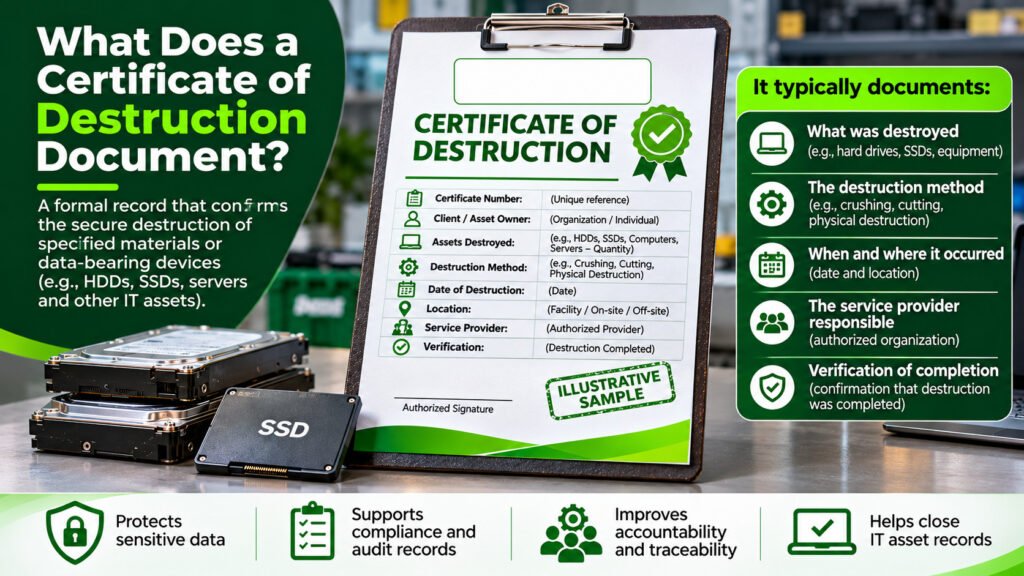
When a business disposes of old computers, hard drives, servers, or other equipment containing sensitive information, how can it demonstrate that the data was securely destroyed? One important document is a Certificate of Destruction (CoD). A Certificate of Destruction records the destruction of specified materials or data-bearing devices. It typically identifies what was destroyed, the destruction method, when and where the process occurred, and the organization responsible. This documentation helps businesses maintain accountability, demonstrate responsible information handling, and support security audits. What Is a Certificate of Destruction? A Certificate of Destruction is a formal record issued by a destruction service provider or responsible organization after specified materials or equipment have been destroyed. In electronic waste management and secure data destruction, certificates are commonly used for hard disk drives (HDDs), solid-state drives (SSDs), servers, storage media, and other assets containing confidential information. The certificate provides documented confirmation of the destruction activity. However, its reliability depends on accurate asset records, appropriate destruction methods, and supporting verification. What Information Does a Certificate of Destruction Document? A well-prepared Certificate of Destruction should contain enough information to identify the destruction job and establish what occurred. Information What it documents Certificate number A unique reference for tracking and verification Client or asset owner The organization authorizing the destruction Asset details Equipment type, quantity, and identifying information Serial numbers Individual device identification, where applicable Destruction method How the equipment or storage media was destroyed Date and location When and where destruction took place Service provider The organization responsible for the process Verification and authorization The recorded confirmation of completion and responsible signatory For large-scale IT disposal projects, a separate asset report may accompany the certificate to provide detailed serial-number records and destruction results. Why Is a Certificate of Destruction Important? A Certificate of Destruction serves several important purposes. 1. Protecting confidential information Businesses handle customer records, financial information, employee details, and other sensitive data. Proper destruction procedures help prevent unauthorized access when storage devices reach the end of their useful life. Learn more about hard drive destruction. 2. Supporting compliance and audits Organizations may need evidence showing how sensitive information was handled during disposal. The UK Information Commissioner’s Office (ICO) recommends obtaining appropriate evidence of secure disposal from third-party providers and checking destruction certificates against the assets sent for destruction. Legal and regulatory requirements vary by country and industry. A certificate supports compliance documentation but does not automatically establish compliance. 3. Improving accountability Certificates provide an identifiable record of the service provider, completed activity, and assets covered. When combined with collection records and chain-of-custody documentation, they help organizations trace equipment through the disposal process. 4. Supporting IT asset management Certificates help IT departments close asset retirement records and demonstrate that equipment designated for destruction was handled according to the organization’s disposal instructions. This is particularly relevant in IT asset disposal and disposition (ITAD). Which Destruction Methods May Be Documented? The method recorded depends on the equipment, security requirements, and agreed service. Common methods include physical crushing, cutting, shredding, and other appropriate processes that render the targeted storage media unusable. Secure data erasure is different from physically destroying a device. Where information is securely erased while the equipment remains reusable, a Certificate of Sanitization or Data Erasure may be a more precise document. The NIST SP 800-88 Revision 2 Guidelines for Media Sanitization provide guidance for selecting suitable sanitization methods and controls based on the sensitivity of information. Importantly, a certificate should describe the method actually performed rather than imply that every possible destruction process was used. Certificate of Destruction vs. Certificate of Recycling Although both documents may be issued during electronic waste management, they serve different purposes. Certificate of Destruction Certificate of Recycling Documents specified destruction activities Documents recycling or material recovery activities Focuses on destruction of designated assets or materials Focuses on processing discarded materials May include serial numbers and destruction methods May include material types, quantities, and recycling information For example, an organization retiring old computers may receive a Certificate of Destruction for the storage drives and separate recycling documentation for the remaining electronic components. Explore computer recycling to understand how equipment can be managed after retirement. How Can You Verify a Certificate of Destruction? Before accepting a certificate, an organization should confirm that the details match its disposal records. Check the certificate reference number, equipment quantities, identifying details, destruction method, date, and issuing organization. Where applicable, review supporting records such as asset inventories, chain-of-custody forms, witness records, or photographs. Any equipment that was not successfully destroyed should be clearly identified rather than reported as completed. A certificate is valuable supporting evidence, but its existence alone does not independently prove that every destruction step was performed correctly. Frequently Asked Questions Is a Certificate of Destruction legally required? Requirements depend on the country, industry, type of information, and applicable regulations or contractual obligations. Even where a specific certificate is not mandatory, documented evidence of secure destruction can support an organization’s accountability. Does a Certificate of Destruction mean data cannot be recovered? Not automatically. Data security depends on the effectiveness of the actual destruction or sanitization method and its verification. The certificate records the process and outcome reported by the issuer. Can a Certificate of Destruction include serial numbers? Yes. Serial numbers help identify the specific storage devices covered by the certificate. For large quantities, the information may be provided in an accompanying asset report. When should a Certificate of Destruction be issued? A final certificate should be issued after the relevant destruction work has been completed and the recorded results have been confirmed. Is a Certificate of Destruction the same as a chain-of-custody document? No. A chain-of-custody record tracks the possession and transfer of equipment, while a Certificate of Destruction documents the destruction activity. Together, they provide a more complete audit trail.
How Can an Organization Build an Effective E-Waste Management Plan?
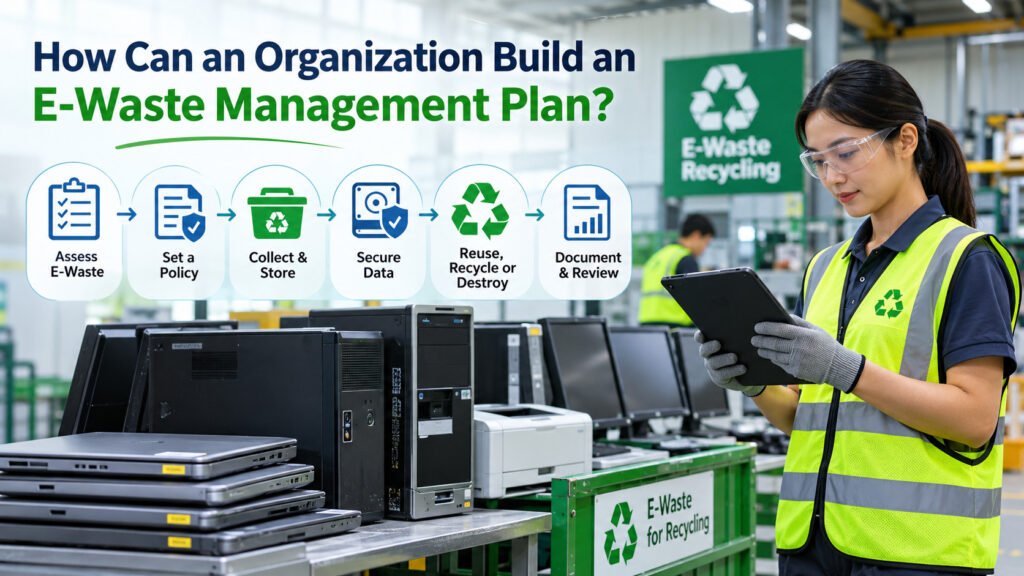
Electronic equipment is essential to modern organizations. Computers, servers, printers, mobile phones, and other devices support daily operations, but eventually become outdated, damaged, or no longer needed. Without a proper management plan, these electronics may accumulate in storage, expose sensitive information, or end up in inappropriate waste streams. An effective e-waste management plan helps organizations manage unwanted electronics safely, protect confidential data, meet applicable regulations, and support responsible recycling. So, how can an organization develop a practical e-waste management plan? What Is an E-Waste Management Plan? An e-waste management plan is a documented process that guides how an organization identifies, collects, stores, reuses, recycles, or disposes of unwanted electrical and electronic equipment. It defines who is responsible for handling electronic waste, how equipment should be managed, and which procedures must be followed before final disposal. A good plan covers the entire equipment lifecycle, from identifying obsolete electronics to documenting their final treatment. Why Is E-Waste Management Important for Organizations? According to the Global E-waste Monitor 2024, approximately 62 million tonnes of electronic waste were generated worldwide in 2022, with only 22.3% documented as formally collected and recycled. Organizations have an important role in addressing this challenge because they regularly replace computers, networking devices, office equipment, and other electronics. Proper e-waste management helps organizations: 8 Steps to Build an Effective E-Waste Management Plan 1. Identify and Assess Electronic Waste The first step is understanding what electronic equipment an organization owns and which devices are approaching the end of their useful lives. Conduct an inventory across offices, departments, warehouses, and other facilities. Common electronic waste includes computers, laptops, monitors, printers, servers, phones, batteries, networking equipment, and electronic storage devices. Record important information such as equipment type, quantity, location, condition, and asset identification number. This assessment helps distinguish equipment that can remain in use from devices requiring repair, replacement, recycling, or disposal. Learn more about what counts as electronic waste. 2. Establish an E-Waste Management Policy An organization should have a clear policy explaining how electronic equipment is managed when it is no longer required. The policy should define who can authorize equipment disposal, how obsolete assets are identified, and the procedures employees must follow. Responsibilities may be shared among IT, procurement, facilities, sustainability, and compliance departments. For example, the IT department may oversee data security, while facilities personnel coordinate storage and collection. Clear responsibilities help prevent unauthorized disposal and ensure consistent handling across departments. 3. Organize Collection and Safe Storage Once obsolete electronics have been identified, they should be collected and stored in designated areas. Electronic waste should not be mixed with ordinary household or office waste. Storage areas should be secure, organized, and protected from weather exposure and unauthorized access. Different equipment categories may require different handling procedures. Batteries, damaged electrical components, and devices containing sensitive data deserve particular attention. Organizations with multiple offices can arrange scheduled collections to avoid unnecessary accumulation. Proper e-waste collection and recycling establishes an accountable process for moving equipment from its original location to an appropriate treatment facility. 4. Protect Data Before Recycling or Disposal Many retired electronic devices contain sensitive information, even when they are no longer functional. Computers, servers, hard drives, solid-state drives, and mobile devices may retain financial information, customer records, employee details, or confidential business files. Before releasing these devices for reuse, recycling, or disposal, organizations should implement suitable data sanitization or destruction procedures. These may include secure data wiping, cryptographic erasure, or physical destruction, depending on the storage technology and security requirements. The NIST Guidelines for Media Sanitization provide a recognized framework for selecting and verifying appropriate sanitization methods. Organizations should maintain records confirming that the required data security procedures were completed. Read more about secure data destruction. 5. Determine Whether Equipment Should Be Reused, Recycled, or Destroyed Not every obsolete electronic device needs to be immediately recycled. Equipment that remains functional may be repaired, refurbished, redeployed, or donated if the organization authorizes it and appropriate data security measures are completed. Devices that cannot be reused may be dismantled and recycled to recover materials such as copper, aluminium, steel, and certain plastics. However, some organizations require the complete destruction of particular electronic assets because of confidentiality, contractual obligations, or internal security policies. The appropriate treatment depends on the equipment’s condition, the owner’s instructions, data security requirements, and applicable regulations. For organizations managing large quantities of retired IT equipment, a structured IT asset disposal (ITAD) process can help maintain accountability. 6. Choose a Qualified E-Waste Recycling Partner A reliable recycling partner is essential for responsible electronic waste management. Before selecting a service provider, organizations should verify that the company has the necessary permits, technical capabilities, and suitable procedures for handling the relevant equipment. A recycling provider should be able to explain how electronics are collected, processed, and transferred to downstream facilities. Organizations should also establish how data-bearing devices and potentially hazardous components will be handled. Depending on the services provided, collection records, recycling reports, and destruction certificates may be available to support accountability. The US Environmental Protection Agency’s guidance on certified electronics recyclers provides useful information on evaluating electronics recycling practices. 7. Follow Environmental and Data Protection Regulations Electronic waste is subject to different environmental and data protection regulations around the world. Organizations must understand the requirements that apply in the countries where they operate. For example, the European Union has established rules under its Waste Electrical and Electronic Equipment (WEEE) framework. International movements of certain electronic waste are also regulated under the Basel Convention. Depending on the jurisdiction, organizations may need to follow rules covering waste handling, transportation, hazardous materials, data protection, and disposal documentation. Understanding these obligations helps organizations select suitable service providers and reduce compliance risks. 8. Maintain Records and Review Performance The final step is documenting what happens to electronic equipment after it has been approved for disposal. Useful records include asset inventories, collection documentation, chain-of-custody forms, data destruction records, and applicable recycling or disposal certificates. These documents help organizations account for retired equipment and support internal
Donate, Reuse or Recycle an Old Computer? A Simple Guide
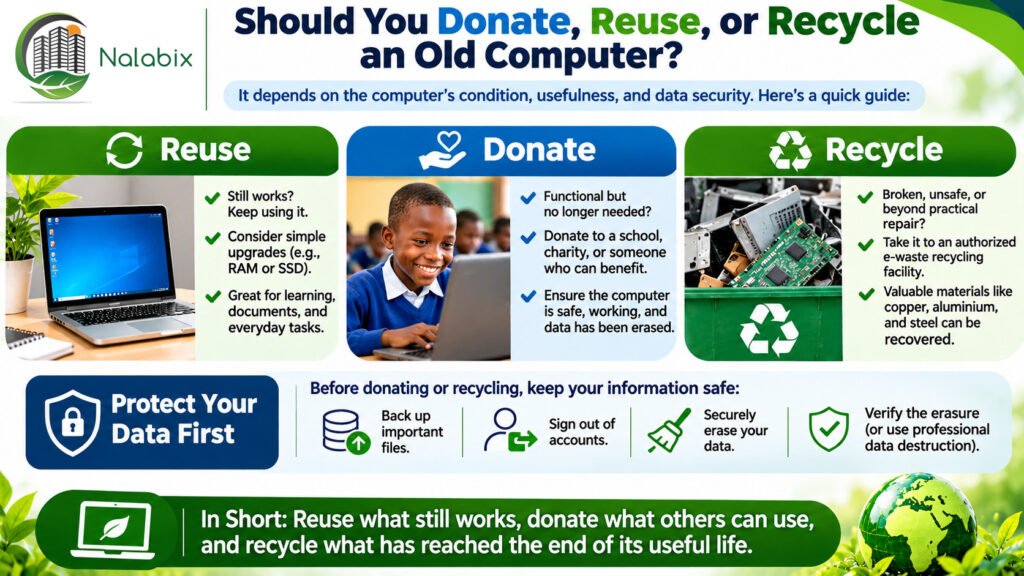
Have an old computer sitting unused at home, in an office, or in a storage room? Before throwing it away, consider whether it could still serve a useful purpose. An outdated computer is not necessarily electronic waste. Some devices can be repaired, upgraded, reused, or donated, while others have reached the end of their useful life and should be recycled responsibly. So, should you donate, reuse, or recycle an old computer? The best choice depends on its condition, functionality, security, and whether someone can still benefit from using it. Quick Answer: Donate, Reuse, or Recycle? Reuse an old computer if it still works safely and meets your needs, especially after a reasonable upgrade. Donate an old computer if it is functional, secure, and suitable for another person, school, charity, or community organization. Recycle an old computer if it is beyond practical repair, unsafe, no longer suitable for reliable use, or cannot be securely prepared for reuse. The general principle is simple: extend the computer’s useful life where practical, and recycle it responsibly when reuse is no longer appropriate. 1. When Should You Reuse an Old Computer? Just because a computer is slow or outdated doesn’t mean it has become useless. In many cases, a computer can continue working for years with appropriate maintenance or upgrades. Consider reusing your computer if: Ways to Give an Old Computer a Second Life An older computer might be useful for basic document work, learning, offline media storage, or other low-demand activities. For example, upgrading the RAM or replacing an older hard disk with a solid-state drive (SSD) may improve performance. However, security matters. A computer running an unsupported operating system should not be used for sensitive or internet-connected activities without an appropriate security solution. Extending the life of electronics can reduce demand for replacement equipment and the resources required to manufacture it. 2. When Should You Donate an Old Computer? If your computer still works but you no longer need it, donating it may be a meaningful alternative to recycling. A functional computer can provide useful technology to someone who might otherwise struggle to access it. Potential recipients include: What Makes a Computer Suitable for Donation? Before donating, ensure that the computer is safe, functional, and useful to its intended recipient. Ideally, it should have a working display, functional keyboard and ports, a suitable power supply, and an operating system that can be maintained securely. Always check with the receiving organization first. Some donation programs only accept computers that meet specific technical requirements. Donating a broken or unusable computer without the recipient’s agreement can simply transfer the recycling burden to someone else. Most importantly, personal or organizational information must be securely removed before ownership is transferred. Learn more about preparing electronics for reuse through the US Environmental Protection Agency’s guidance on electronics donation and recycling. 3. When Should You Recycle an Old Computer? Recycling becomes the preferred option when a computer has reached the end of its practical useful life. Consider recycling if: Computers contain materials such as copper, aluminium, steel, plastics, and circuit boards that may be recovered through appropriate recycling processes. Rather than disposing of computers with ordinary household or commercial waste, use an authorized electronics recycling service. Discover how computer recycling works and why the proper management of obsolete equipment is important. You can also explore what urban mining means and how valuable resources are recovered from discarded electronics. 4. Protect Your Data Before Donating or Recycling Whether you choose to donate or recycle your computer, protecting your personal information should be a priority. An old computer may contain: Simply deleting files, emptying the recycle bin, or reinstalling an operating system may not securely remove all recoverable information. What Should You Do Before Letting Your Computer Go? For organizations managing confidential information, professional data destruction may be necessary before computers are recycled. The NIST SP 800-88 Revision 2 Guidelines for Media Sanitization provide a recognized framework for choosing appropriate sanitization methods. For further reading, explore secure data wiping and professional data destruction services. Important: If a storage device must be physically destroyed, the computer may still have other components suitable for reuse or material recovery. However, the computer will need suitable replacement storage if it is to be donated as a functioning device. 5. Donation vs. Reuse vs. Recycling: Which Is Better? All three options can contribute to responsible electronics management, but each serves a different purpose. Computer condition Recommended action Working and still useful to you Reuse Working but no longer needed Donate Slow but reasonably upgradeable Repair or upgrade Functional but contains sensitive information Securely sanitize before donation or reuse Broken beyond practical repair Recycle Unsafe or severely damaged Arrange specialist recycling Must be destroyed under company policy Authorized destruction and recycling There is no single solution for every old computer. The most responsible decision considers usability, data security, environmental impact, and the needs of the next user. 6. Why Does Your Decision Matter to the Environment? Millions of computers and other electronic devices reach the end of their useful lives every year. According to the Global E-waste Monitor 2024, the world generated approximately 62 million tonnes of electronic waste in 2022, but only 22.3% was documented as formally collected and recycled. This highlights why responsible management of unwanted electronics matters. Reusing or donating a functioning computer can extend its useful life, while recycling helps recover materials from equipment that can no longer be used. Both approaches support a more circular economy, where products and materials remain useful for as long as practical. Read more about the importance of recycling and electronic waste management. 7. What Should Businesses and Organizations Do With Old Computers? For businesses, hospitals, schools, government institutions, and other organizations, deciding what happens to obsolete computers often involves more than evaluating their physical condition. Organizations should also consider: Some organizations allow equipment to be refurbished or donated after secure data sanitization. Others require complete destruction of certain devices or components because of security policies or
What Happens to Your Data Before Hard Drive Recycling?
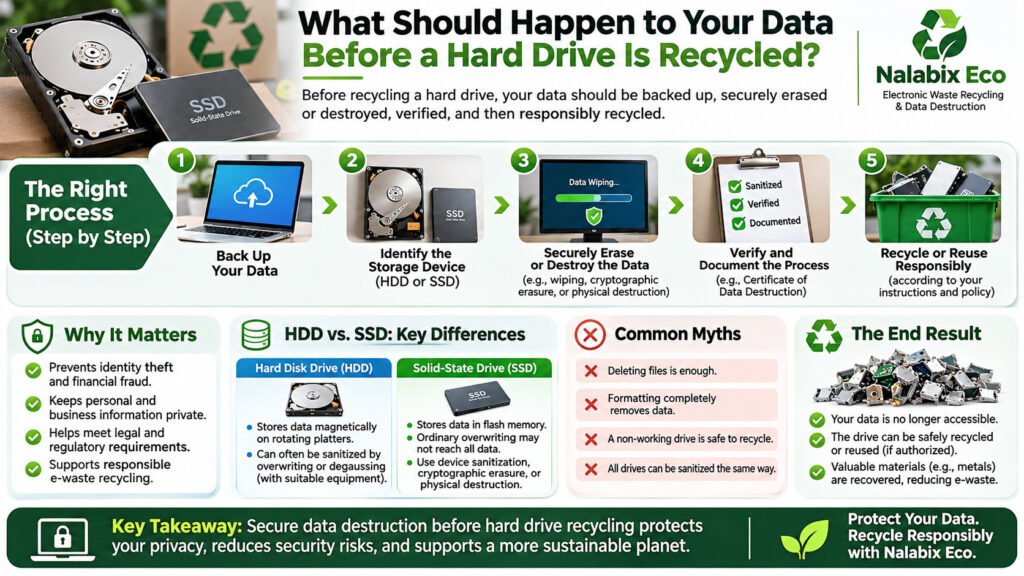
Recycling an old hard drive is a responsible way to reduce electronic waste. But before recycling any storage device, there is something important you should consider: the security of your personal or confidential data. Hard drives can store sensitive information, including passwords, financial records, personal photographs, business documents, emails, and customer information. Even if your computer has stopped working, its hard drive may still contain recoverable data. Before a hard drive is recycled, the information stored on it should be securely sanitized or destroyed to prevent unauthorized access. Understanding how secure data destruction works can help individuals and organizations protect confidential information while disposing of electronics responsibly. What Should Happen to Your Data Before Hard Drive Recycling? Quick answer: Before recycling a hard drive, you should back up important information, securely erase or destroy the remaining data, verify the process, and ensure the storage device is handled responsibly. The process generally involves five important steps: These steps help reduce the risk of exposing sensitive information during electronic waste disposal. Why Is Secure Data Destruction Important Before Recycling? Deleting files or removing a computer’s hard drive does not automatically guarantee that stored information is inaccessible. Without appropriate security measures, discarded storage devices may expose individuals and organizations to: This makes secure hard drive disposal an important part of responsible electronic waste management. How Should Data Be Destroyed Before Hard Drive Recycling? There are several recognized approaches to data sanitization and destruction. The appropriate method depends on the device, its condition, the sensitivity of the information, and whether reuse is permitted. 1. Secure Data Wiping Secure data wiping uses specialized procedures to sanitize storage devices while potentially keeping them functional. For traditional hard disk drives (HDDs), appropriate overwriting or supported device sanitization operations may be used to remove access to previous information. Solid-state drives (SSDs) require additional consideration because internal memory management can make ordinary overwriting unreliable. Where supported, properly implemented device sanitization commands or cryptographic erasure may be suitable. The NIST SP 800-88 Revision 2 Guidelines for Media Sanitization provide internationally useful guidance for establishing effective media sanitization programs. For devices intended for authorized reuse, professional secure data wiping services can help ensure appropriate procedures and verification are followed. 2. Physical Hard Drive Destruction Physical destruction is commonly used when storage devices contain highly sensitive information, are damaged, cannot be reliably sanitized, or must not be reused. Depending on the storage technology and security requirements, suitable processes may include controlled crushing, cutting, or shredding. The destruction method must adequately damage the actual data-bearing components, rather than merely damaging the external casing. For traditional HDDs, these components include the magnetic platters. For SSDs, they include flash memory chips. Once securely destroyed, the remaining materials can proceed through appropriate recycling channels. Learn more about hard drive destruction and secure disposal. 3. Cryptographic Erasure Cryptographic erasure is a sanitization method that makes properly encrypted information inaccessible by securely eliminating the necessary encryption keys. It can be useful for compatible storage devices where encryption was correctly implemented and key sanitization can be verified. However, deleting encryption keys is not automatically sufficient in every situation. The effectiveness of this method depends on the encryption implementation, device configuration, and verification procedures. The UK National Cyber Security Centre’s storage media sanitization guidance provides further information on selecting appropriate approaches for storage media. Is Deleting Files or Formatting a Hard Drive Enough? No. Simply deleting files, emptying the Recycle Bin, or performing a quick format does not reliably sanitize a storage device. Deleting a file may remove its reference from the file system without immediately overwriting the underlying information. Similarly, formatting a drive can recreate its file system while leaving previously stored information recoverable. A factory reset may provide adequate sanitization on certain devices, but its effectiveness depends on how the manufacturer implements the process. For sensitive information, use a suitable verified sanitization method or arrange professional data destruction. HDD vs. SSD: Does the Type of Drive Matter? Yes. HDDs and SSDs use different technologies, meaning their data sanitization requirements are not always the same. Hard Disk Drive (HDD) Solid-State Drive (SSD) Stores data on magnetic platters Stores data using flash memory Appropriate overwriting may be suitable Ordinary overwriting may not reach all previously stored information Can be sanitized or physically destroyed May require supported device sanitization, cryptographic erasure, or destruction Compatible magnetic media may be degaussed Degaussing is ineffective for flash memory Selecting the correct method helps ensure the sanitization process addresses the device’s actual storage technology. What Happens After Secure Data Destruction? After the required sanitization or destruction process has been completed and verified, the device can move to the next stage of its approved disposition process. For recycling, this may include: A successfully sanitized functional drive may be suitable for authorized reuse. However, if the owner requires complete destruction, that instruction must be respected. Responsible computer recycling should combine information security, appropriate material recovery, and environmental responsibility. How Can You Verify That Your Data Was Securely Destroyed? For businesses, institutions, and organizations handling confidential information, verification and documentation are particularly important. A professional service provider may issue a Certificate of Data Destruction and supporting records detailing the work performed. Depending on the service and agreed requirements, documentation may include the device type, serial number, sanitization or destruction method, processing date, verification results, and chain-of-custody records. The Information Commissioner’s Office guidance on hardware asset management also emphasizes appropriate disposal controls and records of secure hardware disposal. A certificate should be supported by a reliable process and relevant evidence rather than being treated as proof on its own. Frequently Asked Questions About Hard Drive Recycling and Data Security Can someone recover data from a recycled hard drive? Yes, potentially. If a hard drive has not been properly sanitized or destroyed, previously stored data may remain recoverable. Secure sanitization or appropriate physical destruction reduces this risk. Should I wipe my hard drive before recycling it? Yes, where possible. Ensure important information is backed up first, then use an
What Should You Do Before Recycling an Old Laptop? 8 Essential Steps
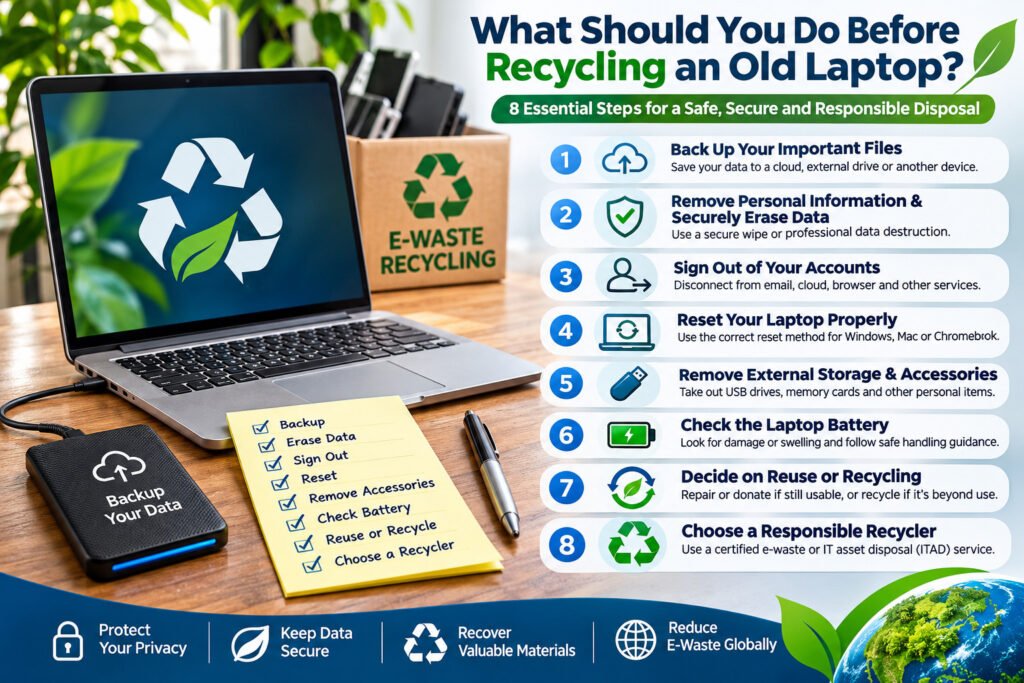
An old laptop may no longer be useful to you, but it can still contain valuable materials and sensitive personal information. Whether you are replacing a slow computer, disposing of a broken laptop, or upgrading office equipment, preparing your device properly is important. Before recycling an old laptop, back up your important files, remove personal information, securely erase stored data, sign out of linked accounts, check the battery, and arrange disposal through a responsible electronics recycler. Following these steps helps protect your privacy, prevent data exposure, and support environmentally responsible recycling. 1. Back Up Your Important Files Before getting rid of your laptop, make sure you have saved everything you want to keep. Important files may include: You can transfer your information to an external storage device, another computer, or a trusted cloud backup service. Important: Confirm that your backup is complete and that you can open the files before deleting anything from your old laptop. 2. Remove Personal Information and Securely Erase Data One of the most important steps before laptop recycling is protecting the information stored on its hard drive or solid-state drive (SSD). Your laptop may contain saved passwords, emails, financial details, photographs, browsing history, and confidential documents. Simply deleting files or emptying the Recycle Bin does not necessarily prevent someone from recovering the information. For ordinary personal devices, follow the manufacturer’s recommended erasure procedure. For sensitive information, consider professional secure data wiping or verified media sanitization. Depending on the device and the required level of protection, options may include secure erasure, cryptographic erasure, or physical destruction of the storage media. For additional information, see our guide to data destruction services. 3. Sign Out of Your Accounts and Disconnect the Laptop Before recycling your laptop, disconnect it from services and accounts you no longer want associated with the device. These may include: Where applicable, remove the laptop from your account’s trusted-device list and disable activation or ownership locks before transferring it to another user. Be careful when deleting cloud-synchronized files. Removing a synchronized file from your laptop may also remove it from other connected devices. Remember: Signing out of an account does not securely erase information already stored on the laptop. 4. Reset Your Laptop Using the Appropriate Method A factory reset can help prepare a laptop for recycling or transfer, but the correct procedure depends on the operating system. For Windows laptops On Windows 11, open Settings → System → Recovery → Reset PC and select Remove everything. Where available, enable the Clean data option when preparing the device for recycling or transfer. Microsoft notes that its consumer reset functionality does not meet government or industry data-erasure standards. For Apple MacBooks On compatible Macs, use Erase All Content and Settings to reset the computer. Older Macs may require a different procedure. Follow Apple’s official instructions for your specific model and macOS version. For Chromebooks Use the Powerwash factory reset feature after backing up any locally stored files. School- or company-managed Chromebooks may require assistance from an administrator. For business laptops or computers containing highly confidential information, a factory reset alone may not meet your security requirements. Professional hard drive destruction may be appropriate when storage media must not be reused. 5. Remove External Storage Devices and Personal Accessories Check your laptop carefully before handing it over for recycling. Remove USB flash drives, memory cards, external hard drives, security keys, and other personal accessories. If the internal storage drive requires separate destruction, arrange this with a qualified service provider. You can also gather unwanted chargers, docking stations, cables, and other electronic accessories for appropriate recycling. Avoid opening or dismantling a laptop unless you have the necessary technical knowledge and can do so safely. 6. Check the Laptop Battery Most modern laptops contain rechargeable lithium-ion batteries that require appropriate handling at the end of their useful life. Before recycling: If a battery is swollen or damaged, stop using or charging the device and seek specialist handling advice. A responsible electronics recycler can advise whether the battery should remain installed or be separated by trained personnel. 7. Decide Whether the Laptop Should Be Reused or Recycled Not every unwanted laptop is beyond repair. A functional laptop may be suitable for repair, refurbishment, or reuse after the necessary data protection measures have been completed. However, devices that are severely damaged, obsolete, or unsuitable for reuse may require dismantling and material recovery. The final treatment should also respect the owner’s instructions. Some individuals and organizations require complete destruction of their electronic assets rather than refurbishment or reuse. Read more about responsible computer recycling and how unwanted computers can be managed at the end of their useful life. 8. Choose a Responsible Laptop Recycling Provider Once your laptop is ready, the final step is arranging collection or delivery to an appropriate electronics recycling facility. A responsible recycler should be able to explain how electronic waste is collected, handled, processed, and sent for downstream recycling. Depending on the services requested, the process may include secure data destruction, component separation, material recovery, and relevant documentation. For organizations disposing of multiple laptops, an IT Asset Disposal (ITAD) service can provide additional controls such as asset inventories, chain-of-custody records, data destruction procedures, and completion certificates. To understand available collection arrangements, explore our e-waste pickup and recycling services. Why Is Proper Laptop Recycling Important? Laptops contain materials such as aluminium, copper, steel, plastics, and electronic components that can be processed through appropriate recycling systems. Responsible recycling helps recover useful materials, reduce avoidable waste, and limit environmental harm associated with improper disposal. It also provides an opportunity to manage batteries and other components requiring specialized handling. Learn more about what is considered electronic waste and why it should be managed responsibly. Frequently Asked Questions Should I remove the hard drive before recycling my laptop? Not always. If the hard drive or SSD has been appropriately sanitized, or the recycling provider will securely destroy it, removal may not be necessary. For sensitive information, confirm the agreed destruction method
What Does WEEE Mean? A Guide to Electronic Waste
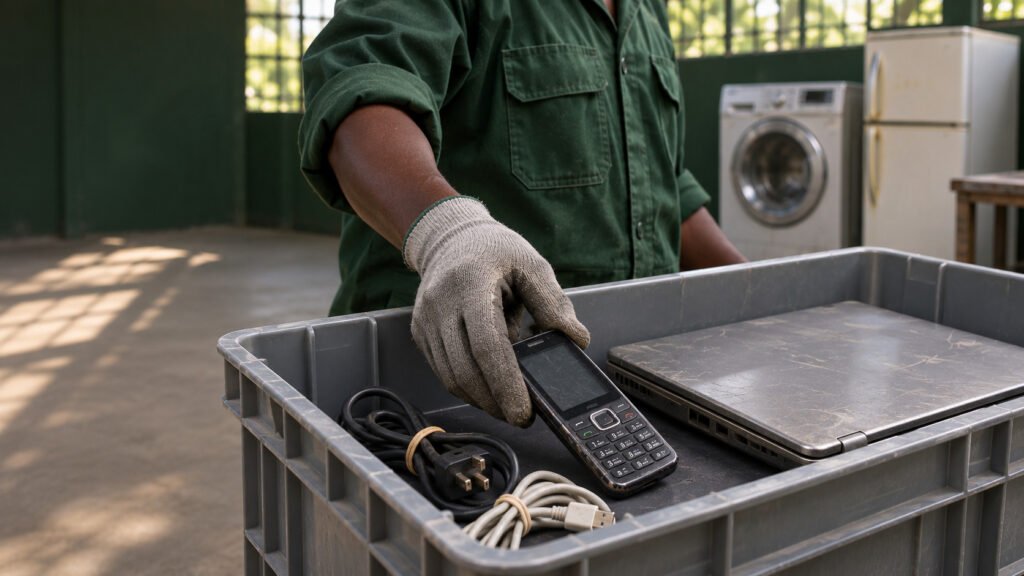
WEEE stands for Waste Electrical and Electronic Equipment. It means electrical or electronic equipment that has been discarded, such as old phones, laptops, refrigerators, televisions and washing machines. In everyday language, WEEE is commonly called e-waste or electronic waste. A cracked phone, a broken kettle and a working printer your office has decided to discard can all become WEEE. What matters is what happens to the item. A laptop you still use, keep as a spare or pass on to someone who will use it can stay in service. Once you discard it, it enters the e-waste stream. What counts as WEEE? WEEE covers everyday appliances as well as computers and other electronic devices. The European Union’s WEEE Directive groups equipment into six categories. These categories are a handy way to recognise common types of e-waste. Local collection rules and classifications can vary. Equipment category Common examples Cooling and temperature-control equipment Refrigerators, freezers, air conditioners and heat pumps Screens and monitors Televisions, computer monitors and laptops Lamps Fluorescent tubes, compact fluorescent bulbs and LED lamps Large equipment Washing machines, dishwashers and solar panels Small equipment Kettles, toasters, electric shavers and electronic toys Small IT and telecom equipment Mobile phones, routers and small printers What does the crossed-out wheelie bin mean? The crossed-out wheelie bin symbol means the equipment should be collected separately from ordinary household rubbish. If you see it on a device, look for a local electronics collection point, a retailer take-back programme or a specialist e-waste recycler. Check whether the programme accepts your item before taking it in. Why does WEEE need separate collection? A discarded device can contain materials worth recovering, such as metals, plastics and glass, alongside parts that need specialist handling. A refrigerator, for example, contains refrigerant that needs to be handled properly. Separate collection allows recyclers to recover useful materials and manage hazardous components safely.The scale is significant. According to the Global E-waste Monitor 2024, the world generated 62 million tonnes of e-waste in 2022. Only 22.3% was documented as formally collected and recycled in an environmentally sound manner. How do you dispose of old electronics responsibly? What happens to WEEE after collection? The recycler sorts equipment by type and determines how to process it. Suitable items may be prepared for reuse where the owner authorises it. If a client requires full destruction of retired equipment, agree on that before collection. Equipment sent for recycling is dismantled or otherwise processed to separate recoverable materials and direct components that need specialist treatment to the appropriate facility. Frequently asked questions Is WEEE the same as e-waste?Yes, in everyday use. E-waste is the familiar term, while WEEE is the formal abbreviation used in electronics waste regulations and reporting. The specific rules depend on where you are. Can a working device be WEEE?Yes. A working device can become WEEE when it is discarded. A functioning laptop passed directly to someone for continued use is a different situation from a laptop handed over for disposal. Are loose batteries WEEE?Loose batteries typically go through a dedicated battery collection programme. For a device with a built-in battery, ask the electronics recycler how to hand it over. Keep lithium-ion batteries and devices containing them out of household rubbish and mixed recycling bins. Arrange e-waste collection with Nalabix Eco Nalabix Eco kenya can help with e-waste collection, responsible recycling and secure data destruction. Send us your location, the types of equipment, the estimated quantity and any destruction or documentation requirements. We’ll confirm the arrangements before collection. Contact Nalabix Eco · +254 715 728 355 · info@nalabix.com. Nalabix
What Counts as Electronic Waste?
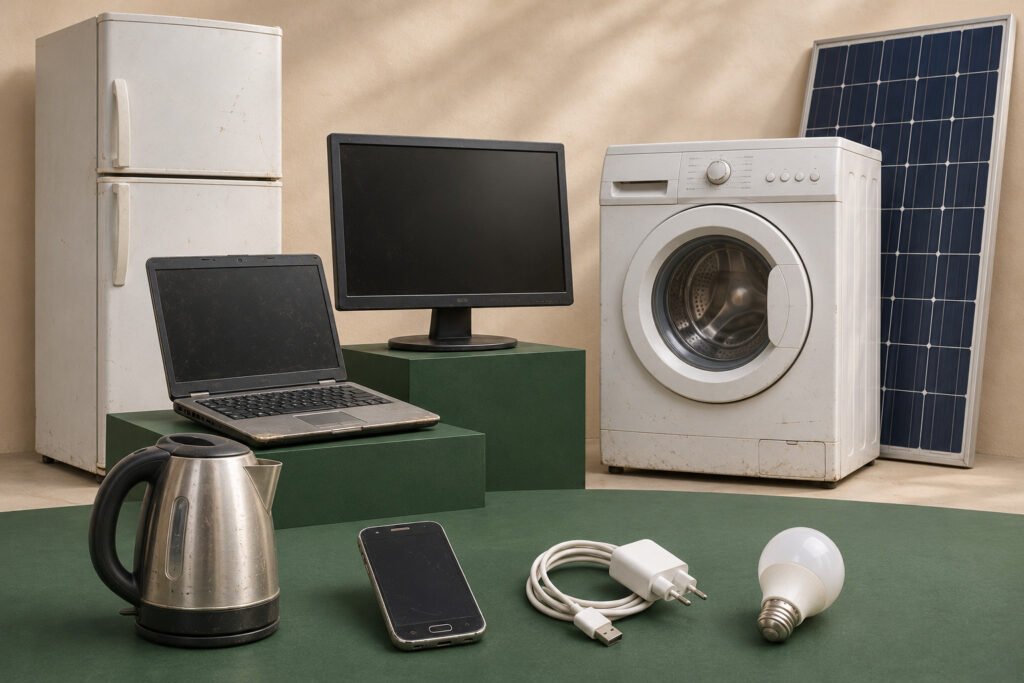
A cracked phone is an obvious example of electronic waste. But what about a broken kettle, a box of old chargers or a refrigerator that no longer cools? These can all count as e-waste. The term covers everyday electrical appliances as well as computers and other digital devices. What is electronic waste? Electronic waste, or e-waste, is electrical or electronic equipment and its parts that have been discarded as waste. You may also see the term WEEE, which stands for waste electrical and electronic equipment. A device’s age and condition can help you decide what to do with it, but what matters for this definition is whether it’s being discarded. A working printer sent for recycling can count as e-waste, while a working printer passed on for someone else to use is second-hand equipment. Common examples of e-waste Category Examples Computers and communications equipment Desktop computers, smartphones, routers and printers Screens and monitors Televisions, computer monitors, laptops and tablets Cooling equipment Refrigerators, freezers and air conditioners Large electrical equipment Washing machines, dishwashers and solar panels Small electrical equipment Kettles, toasters, electric shavers and battery-powered toys Lighting LED bulbs and fluorescent tubes These examples follow the broad categories used in the Global E-waste Monitor. The items an individual collection programme accepts can vary by location. What about chargers, cables and batteries? Chargers and cables are easy to overlook when clearing out a drawer or an office storeroom. Check whether your local electronics collection service accepts them alongside devices. Loose batteries may need a separate drop-off, and devices with built-in rechargeable batteries may have specific collection instructions. Keep lithium-ion batteries and devices containing them out of household rubbish and mixed recycling bins. What should you do with unwanted electronics? A simple rule for your next clear-out: if an item uses electricity or batteries and you’re ready to discard it, check your local e-waste guidance first. That applies to the charger in your drawer just as much as the fridge in your kitchen.
Top Countries Producing E-Waste
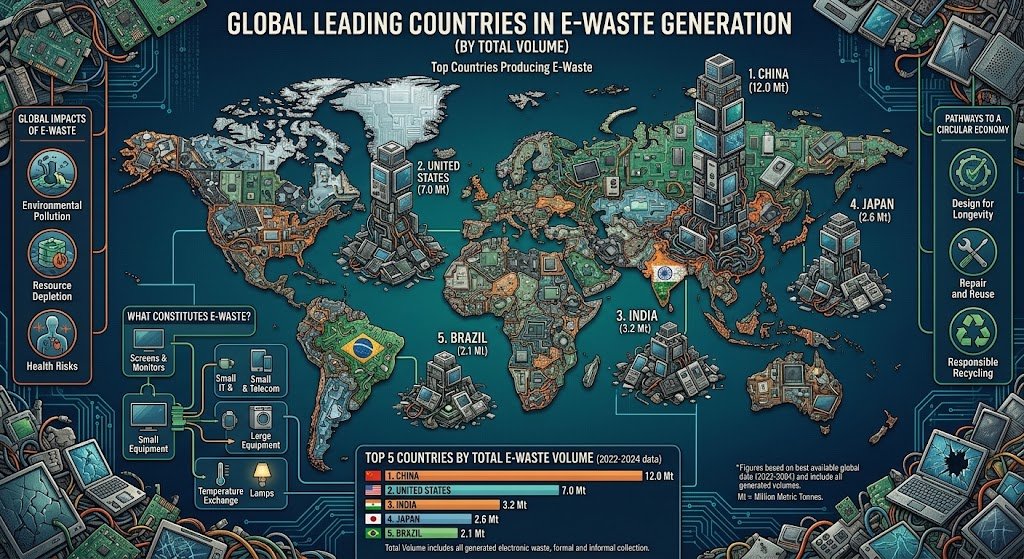
Electronic waste, or e-waste, is one of the fastest-growing waste streams in the world. Every year, households, businesses, governments, and industries replace millions of computers, phones, televisions, appliances, and other electronic devices. But which countries produce the most e-waste? The answer is closely linked to population size, technology use, consumer purchasing power, and how frequently electronic products are replaced. Understanding where the largest amounts of e-waste are generated helps governments, businesses, and recyclers develop better collection and recycling systems. What Is E-Waste? E-waste refers to discarded electrical and electronic equipment and its components. It includes products that are broken, obsolete, unwanted, or reaching the end of their useful life. Common examples include: Although these products contain valuable materials such as copper, aluminium, steel, gold, and other recoverable resources, some also contain substances that require careful handling and controlled recycling. Countries That Generate the Most E-Waste According to international e-waste assessments, China, the United States, India, Japan, and Brazil are among the world’s largest e-waste-generating countries by total volume. 1. China China generates the largest amount of e-waste globally in absolute terms. Its huge population, extensive electronics manufacturing industry, rapid technological development, and high domestic consumption all contribute to the country’s large e-waste stream. The country has also invested heavily in formal recycling infrastructure and policies designed to improve the management of discarded electronics. 2. United States The United States is another major generator of electronic waste. High levels of electronics ownership, frequent device replacement, and strong consumer demand for newer technology contribute significantly to its e-waste generation. Computers, smartphones, televisions, household appliances, and other consumer electronics make up a substantial portion of the waste stream. 3. India India’s rapidly growing economy, large population, increasing access to technology, and expanding use of electrical and electronic equipment have contributed to significant growth in e-waste generation. The country faces the challenge of expanding formal collection and recycling systems as more electronics reach the end of their useful lives. 4. Japan Japan is a highly developed and technology-intensive economy with widespread use of electrical and electronic products. Although its total e-waste volume is smaller than that of China, the United States, and India, Japan has developed structured systems for managing and recycling many categories of electronic products. 5. Brazil Brazil is one of the largest e-waste generators in Latin America. Its large population, growing electronics market, and increasing consumption of electrical and electronic equipment contribute to substantial e-waste generation. Improving collection networks and increasing public participation in formal recycling remain important parts of managing the growing waste stream. Why Do Some Countries Produce More E-Waste? E-waste generation is not determined by population alone. Several factors influence how much electronic waste a country produces. Population Size Countries with large populations naturally have more consumers using electronic products. Even a relatively small amount of e-waste per person can result in a large national total. Consumer Electronics Use Countries where computers, smartphones, televisions, appliances, and other electronics are widely used tend to generate more discarded equipment. Device Replacement Rates Technology changes quickly. Consumers and organizations may replace functioning equipment because newer products offer improved performance, features, energy efficiency, or compatibility. Economic Development Higher-income economies generally have greater access to electrical and electronic equipment. As ownership increases, so does the amount of equipment eventually reaching end of life. Business and Industrial Activity Businesses, data centers, telecommunications companies, financial institutions, manufacturers, and other organizations can generate significant quantities of obsolete IT equipment and electronic components. Total E-Waste vs E-Waste Per Person There is an important difference between total e-waste generation and e-waste generated per person. A country with a very large population may generate the most e-waste overall, even if the amount generated per person is relatively moderate. Meanwhile, smaller and wealthier countries can generate comparatively high amounts of e-waste per capita. This distinction is important when comparing countries because total volume shows the scale of the national waste challenge, while per-capita figures provide insight into consumption and disposal patterns. Where Does All This E-Waste Go? Not all discarded electronics are managed in the same way. Depending on the country and waste management system, e-waste may be: Formal recycling is important because electronic equipment contains both valuable resources and potentially hazardous components. Proper processing allows materials to be recovered while reducing environmental and occupational risks. Why E-Waste Recycling Matters Recycling electronics is not simply about getting rid of old devices. It is also about recovering resources and reducing the environmental impact associated with producing new materials. Responsible e-waste recycling can help: For businesses, proper electronic waste management can also support environmental compliance, responsible asset disposal, and secure handling of data-bearing equipment. The Global E-Waste Challenge The countries generating the most e-waste demonstrate the scale of the global electronics challenge. However, e-waste is not only a problem for the largest generators. As access to technology continues to expand across Africa, Asia, Latin America, and other emerging markets, more countries are expected to face growing volumes of discarded electrical and electronic equipment. The solution requires more than simply recycling more devices. Countries need effective collection systems, responsible product design, reuse and refurbishment programs, formal recycling infrastructure, public awareness, and policies that support a circular economy. Final Thoughts China, the United States, India, Japan, and Brazil are among the world’s major e-waste-generating countries by total volume. Their experiences highlight how population, economic development, technology adoption, and consumer behavior influence electronic waste generation. But the global lesson is broader: every country that uses electronics must also plan for what happens when those products reach the end of their useful lives. Responsible e-waste management can turn discarded electronics from a growing environmental challenge into an opportunity to recover resources, protect the environment, and build a more circular economy. Have obsolete electronics that need responsible handling? Businesses and organizations can use professional e-waste collection, recycling, data destruction, and IT asset disposal services to ensure unwanted electronics are managed responsibly.
Future Predictions for Electronic Waste: What to Expect
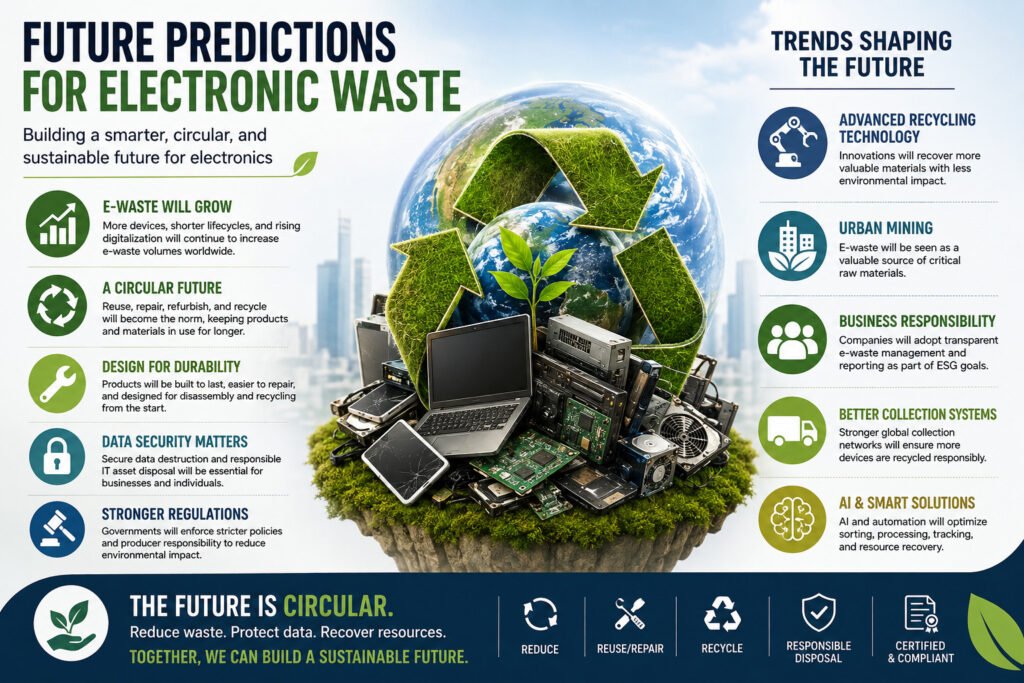
Technology is advancing faster than ever. New smartphones, computers, appliances, electric devices, networking equipment, and connected technologies are entering our homes and workplaces every year. But there is another side to this technological progress: what happens when these devices become obsolete? Electronic waste, commonly known as e-waste, is already one of the world’s fastest-growing waste streams. According to the Global E-waste Monitor 2024, the world generated approximately 62 million tonnes of e-waste in 2022, while only 22.3% was documented as formally collected and recycled. The same report projects global e-waste generation to reach 82 million tonnes by 2030 if current trends continue. These figures highlight an important question: What will the future of electronic waste look like? 1. E-Waste Will Continue to Grow The amount of electronic equipment in use worldwide is unlikely to decline. Digital transformation, expanding internet access, connected devices, technological upgrades, and rising consumption are all contributing to greater demand for electronics. As more products reach the end of their useful lives, more e-waste will be generated. The challenge is not simply producing more recycling capacity. It is building systems that can keep pace with the growth of electronic products from the moment they are manufactured to the moment they reach end of life. 2. The Electronics Industry Will Move Toward a Circular Economy The traditional model of make, use, and discard is becoming increasingly difficult to sustain. The future is likely to place greater emphasis on a circular electronics economy, where products and materials remain useful for as long as possible. This means giving greater attention to: Instead of treating an obsolete device as worthless waste, the circular economy looks at what can still be used, repaired, recovered, or recycled. 3. Longer Product Lifespans Will Matter More One of the simplest ways to reduce e-waste is to keep electronic products in use for longer. Future sustainability efforts are therefore likely to focus more strongly on product durability, repairability, software support, replacement parts, and maintenance. A device that remains functional for several additional years does not immediately become another item requiring collection and recycling. This makes extending product life an important part of future e-waste management. 4. Repair and Refurbishment Will Become More Important Not every old electronic device needs to be recycled immediately. Some equipment can be repaired, upgraded, refurbished, or reused. This can preserve the value already invested in the product and delay the need for new materials and manufacturing. As businesses and consumers become more conscious of electronic waste, repair and refurbishment are likely to become increasingly important parts of the electronics lifecycle. However, equipment that cannot be safely or economically reused should still enter an appropriate recycling or disposal process. 5. E-Waste Will Become an Increasingly Valuable Source of Materials Electronic devices contain valuable materials, including metals and other recoverable resources. The Global E-waste Monitor 2024 estimated that e-waste generated in 2022 contained approximately 31 million tonnes of metals, alongside significant quantities of plastics and other materials. This creates an opportunity for urban mining—recovering useful materials from discarded products rather than relying entirely on newly extracted resources. As demand for raw materials grows, responsible e-waste recycling could become increasingly important to resource security and the circular economy. 6. Recycling Technology Will Become More Advanced The future of e-waste recycling will depend partly on better technology. Improved sorting, dismantling, material separation, automated processing, and recovery technologies can help recyclers extract useful materials more efficiently. Artificial intelligence, robotics, sensors, and data systems may also play a greater role in identifying equipment, improving sorting processes, tracking materials, and optimizing recycling operations. Technology will therefore be both a driver of e-waste growth and an important part of the solution. 7. Data Security Will Become a Bigger Part of E-Waste Management Electronic waste is not only an environmental issue. Computers, servers, smartphones, hard drives, SSDs, and other storage devices may contain sensitive information long after an organization stops using them. As businesses increasingly rely on digital information, secure data sanitization and physical data destruction will become even more important when equipment reaches end of life. Future IT asset disposal programs will increasingly need to combine: Asset management + data security + environmental responsibility. Properly managing an old device should therefore involve both protecting the information stored on it and ensuring the equipment is handled responsibly. 8. Businesses Will Face Greater End-of-Life Responsibility Organizations are likely to become more accountable for what happens to their electronic equipment after it leaves the workplace. This is especially important for companies managing large quantities of: Businesses will increasingly need documented processes for asset tracking, secure data destruction, responsible recycling, and environmental reporting. E-waste management is therefore likely to become more closely connected with corporate sustainability, risk management, compliance, and governance. 9. E-Waste Regulations Will Continue to Develop Governments are increasingly recognizing that e-waste requires dedicated policies, infrastructure, and enforcement. The Global E-waste Monitor 2024 reported that 81 countries had an e-waste policy, legislation, or regulation in place in 2023, although enforcement and implementation remain significant challenges. Future policies may place greater emphasis on areas such as: Regulatory requirements will vary between countries, but stronger accountability is likely to remain an important global trend. 10. Product Design Will Help Determine How Much E-Waste We Create The future of e-waste begins before a product reaches the consumer. Manufacturers can influence the eventual waste generated by designing products that are: This approach is sometimes described as designing for circularity. If products are designed with their entire lifecycle in mind, recycling and resource recovery can become easier at the end of their useful life. 11. Collection Infrastructure Will Need to Catch Up A recycling system is only effective when discarded electronics can reach appropriate collection and processing facilities. Many parts of the world still face challenges involving collection points, transportation, public awareness, recycling infrastructure, and access to formal e-waste management. The future will therefore require stronger connections between consumers, businesses, manufacturers, retailers, governments, collection providers, and recyclers. Better collection means more electronics can enter formal
Fastest Growing Waste Stream in the World
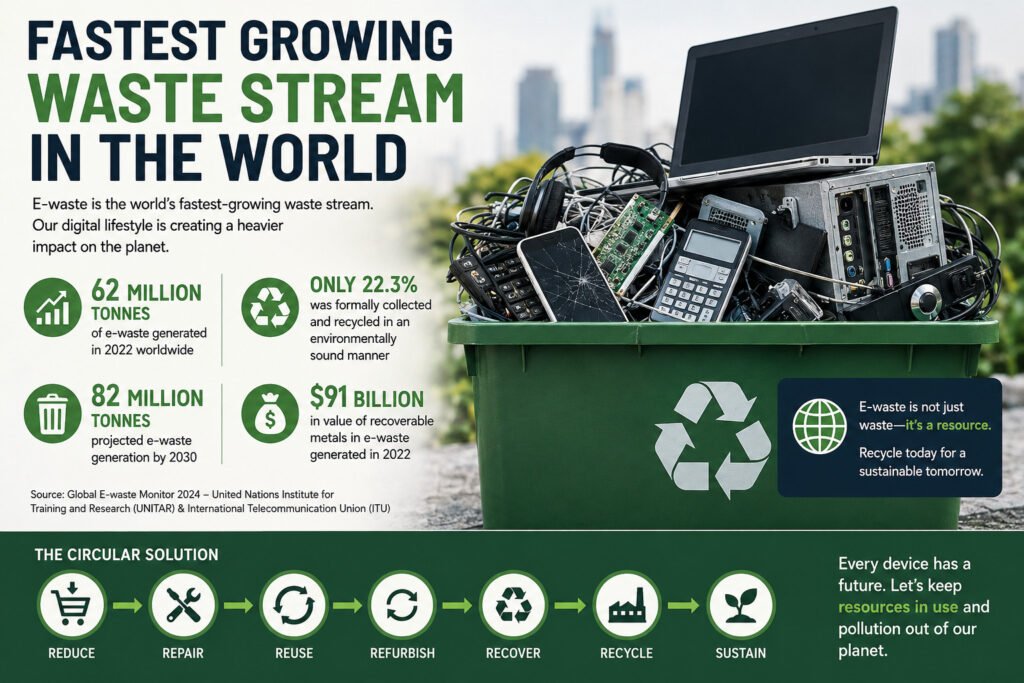
Technology has transformed the way the world works, communicates, learns, travels, and does business. But behind every new smartphone, computer, television, appliance, server, and electronic device is another growing challenge: what happens when that equipment reaches the end of its useful life? The answer is increasingly important because e-waste is the world’s fastest-growing waste stream. According to the Global E-waste Monitor 2024, the world generated approximately 62 million tonnes of electronic waste in 2022. Only 22.3% of that amount was documented as formally collected and recycled in an environmentally sound manner. Global e-waste generation is projected to reach approximately 82 million tonnes by 2030 if current trends continue. The issue is therefore not simply about having more waste. It is about managing a rapidly growing stream of products that contain both valuable resources and materials requiring responsible handling. What Is E-Waste? E-waste, short for electronic waste, refers to discarded electrical and electronic equipment and its components. It can include products that are broken, obsolete, unwanted, or simply no longer needed. Common examples include: As technology becomes integrated into more areas of everyday life, the definition of e-waste continues to expand. Why Is E-Waste Growing So Quickly? The growth of e-waste is not caused by a single factor. It is the result of several changes happening at the same time. 1. Rapid Technological Innovation Technology evolves quickly. New processors, operating systems, connectivity standards, features, and product generations are continuously introduced. As newer technology becomes available, older equipment may become less useful, incompatible with modern systems, or too expensive to maintain. This accelerates the replacement cycle. 2. More Electronics in Everyday Life Electronics are now used across homes, offices, schools, hospitals, factories, transport systems, financial services, telecommunications, and government. The world is becoming increasingly dependent on digital infrastructure. More equipment in use eventually means more equipment reaching end of life. 3. Shorter Replacement Cycles Many electronic products are replaced before they completely stop functioning. Businesses may upgrade equipment because of performance, security, compatibility, or operational requirements. Consumers may replace devices because of new features or changing needs. When replacement happens faster than repair, reuse, or refurbishment, the volume of discarded electronics increases. 4. Growing Digitalization Cloud computing, smartphones, connected devices, automation, artificial intelligence, telecommunications, and digital services all depend on physical electronic infrastructure. The expansion of the digital economy therefore has an environmental side effect: more electronic equipment eventually needs to be managed at the end of its useful life. 5. Limited Repair, Reuse and Refurbishment A device that cannot be economically repaired or reused is more likely to become waste. Limited access to spare parts, repair expertise, software support, and refurbishment markets can shorten the practical life of electronics. The result is a growing gap between the amount of equipment being discarded and the amount being successfully kept in use. How Much E-Waste Does the World Generate? The scale of the problem is significant. The Global E-waste Monitor 2024 reported that global e-waste generation increased from approximately 34 million tonnes in 2010 to 62 million tonnes in 2022. During the same period, documented formal collection and recycling increased from about 8 million tonnes to 13.8 million tonnes. However, e-waste generation grew much faster than formal recycling. The report projects global e-waste generation to reach approximately 82 million tonnes by 2030 under current trends. This growing gap between generation and formal recycling is one of the world’s biggest waste-management challenges. E-Waste Is More Than Just Waste One of the most important things about electronic waste is that it contains resources that can potentially be recovered. The 2024 Global E-waste Monitor estimated that e-waste generated in 2022 contained around: The metals embedded in that e-waste were estimated to have a value of around US$91 billion. These materials can include copper, aluminium, iron, and other valuable metals. This is why responsible e-waste recycling is increasingly connected to the concept of urban mining—recovering useful materials from products that have already entered society rather than relying entirely on new extraction. Why Is Improper E-Waste Disposal a Problem? When electronic equipment is improperly dumped, burned, dismantled, or processed, it can create environmental and health risks. Some electronic products contain hazardous substances or components that require controlled handling. Improper management can contribute to: The problem is particularly serious where appropriate collection, recycling, treatment, and enforcement systems are limited. The Global E-waste Monitor reported that formally documented collection and recycling in African countries was less than 1% in 2022, highlighting the need for stronger infrastructure and responsible e-waste management across the region. The Hidden Cost of Lost Resources Improper disposal does not only create pollution risks. It can also mean losing valuable materials that could have been recovered. The Global E-waste Monitor estimated that approximately US$62 billion worth of recoverable natural resources was left unaccounted for through inadequate e-waste management in 2022. Recycling electronics can therefore serve two purposes: Reduce waste while recovering resources. This makes e-waste management an important part of the transition toward a more circular economy. What Is the Circular Economy for Electronics? Traditional production often follows a linear model: Take → Make → Use → Dispose A circular approach aims to keep products, components, and materials useful for as long as possible: Reduce → Repair → Reuse → Refurbish → Recover → Recycle Instead of immediately treating an unwanted device as waste, its remaining value is considered first. A suitable device may be reused or refurbished. Components may be recovered. Materials from equipment that has reached true end of life can be separated and recycled. The goal is to reduce unnecessary waste while keeping valuable resources in circulation. What Happens to Electronics at the End of Their Life? Responsible end-of-life management can involve several stages. 1. Collection Equipment is collected from households, businesses, institutions, or facilities through appropriate channels. 2. Assessment and Sorting Items are assessed to determine whether they can be reused, refurbished, dismantled, or recycled. 3. Data Security Data-bearing equipment requires special attention. Computers, servers, hard drives, SSDs, phones, and other storage